Security system installation used to mean putting a box in the rack, forwarding logs, and hoping the SOC dashboard turned red before the attacker got comfortable. That model does not survive modern software delivery.
In 2026, the thing most likely to open your production environment is not a badge reader or an exposed admin panel. It is a pull request that changes a GitHub Actions workflow, adds a new npm package, widens a token permission, or runs untrusted code in a trusted CI context.
Teams think the problem is security system installation. The real problem is installing security into the delivery path without breaking delivery, creating alert spam, or giving developers a pile of findings nobody owns.
That changes the conversation. This is not a definition post about what a security system is. It is an operator guide for turning CI/CD and software supply-chain controls into an installed, maintained, validated security system.
Table of contents
- Security system installation in 2026 is pipeline architecture
- Start with ownership before tooling
- Map the CI/CD attack surface
- Choose controls that run where risk enters
- Build the installation workflow
- What breaks when installation is done badly
- What works: opinionated defaults and evidence
- What fails: tool sprawl and checkbox compliance
- Validation and response after installation
- Where vu1nz.com fits in the stack
- Closing: make security system installation part of delivery
Security system installation in 2026 is pipeline architecture
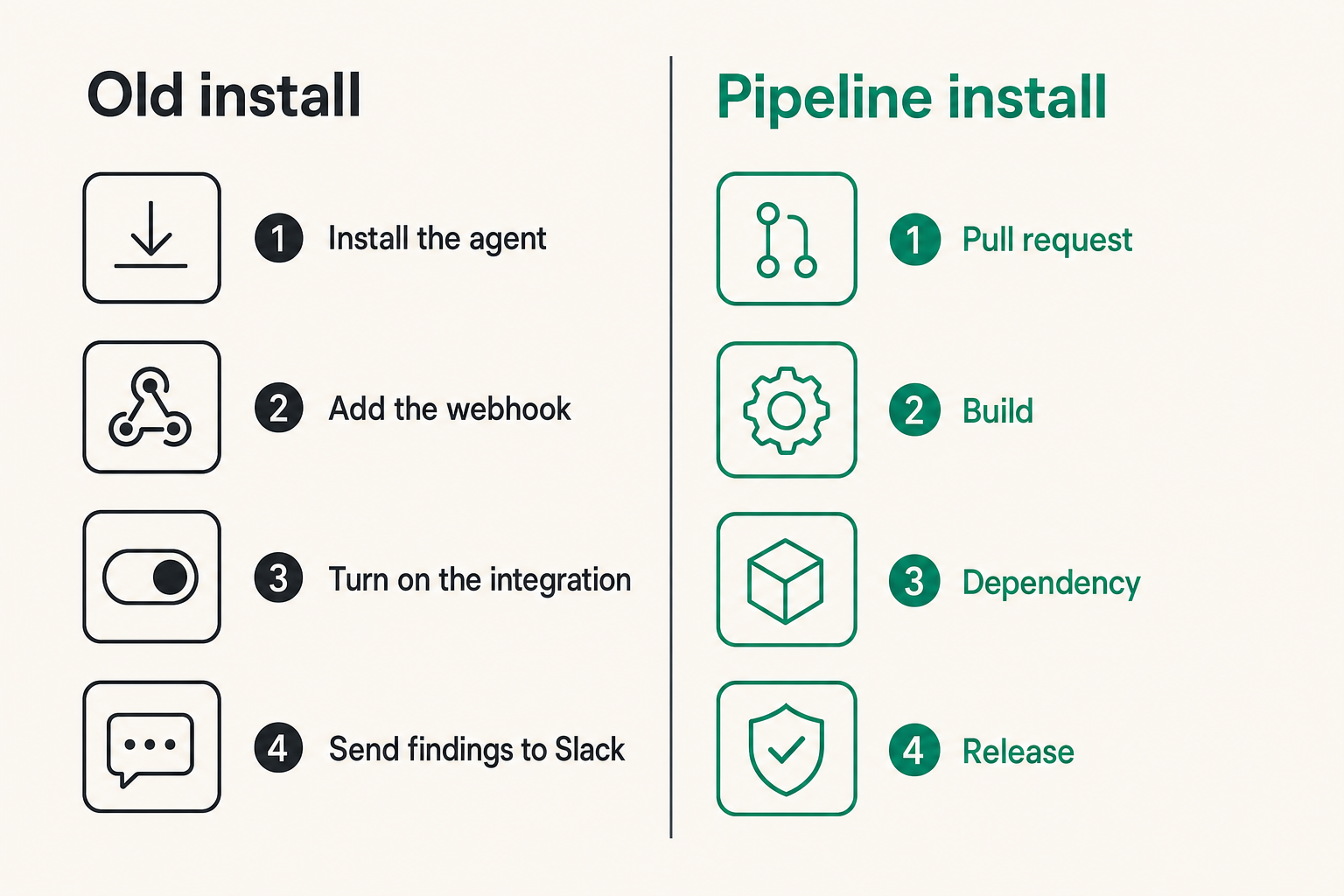
Why the old install model fails
The mistake teams make is treating security system installation as a deployment task. Install the agent. Add the webhook. Turn on the integration. Send findings to Slack. Done.
That is not installation. That is attachment.
A real security system changes the path an unsafe change must travel. It decides where a signal is generated, where it is evaluated, who owns the decision, what evidence is kept, and what happens when the system is wrong.
For CI/CD, the old install model fails because the attacker does not need to touch the runtime first. They can alter the machinery that builds, tests, signs, packages, or deploys the runtime. If the pipeline is trusted blindly, a malicious workflow step can become a privileged operator.
What a modern install has to protect
A useful way to think about it is that CI/CD security system installation protects four planes:
| Plane | Typical assets | Practical risk |
|---|---|---|
| Source plane | repos, branches, pull requests | malicious code or workflow changes entering review |
| Build plane | runners, actions, build scripts | untrusted code gaining tokens or secrets |
| Dependency plane | npm, pip, cargo, gem, Go, Composer | new packages, typosquats, maintainer compromise |
| Release plane | artifacts, tags, registries, deploy jobs | tampered artifacts or unauthorized promotion |
The practical question is not which scanner has the longest feature list. The practical question is where a bad change first becomes dangerous, and whether your installed controls are there before the merge.
Practical rule: Install controls at trust transitions, not only at asset boundaries. In CI/CD, the dangerous moment is often when untrusted input becomes trusted automation.
Related reading from our network: SOC teams face the same architecture problem when they build incident flows before the pager fires, which is why this emergency response guidebook for SOC teams is a useful adjacent model for ownership and validation.
Start with ownership before tooling
Define who owns each control
Security tooling without ownership turns into a backlog generator. Someone installs a scanner. It finds a risky workflow permission. The repo owner says platform owns workflows. Platform says the service team owns repo changes. Security says it is a policy violation. The pull request sits, or worse, someone bypasses it.
Before installing anything, define ownership at the control level:
- Repository owners own code and dependency changes.
- Platform engineering owns runner configuration and reusable workflows.
- Security owns policy, severity, and exception criteria.
- Release engineering owns artifact promotion and signing gates.
- Incident response owns escalation when a finding suggests active compromise.
This does not need to be bureaucratic. It needs to be explicit enough that a failed gate creates an action, not a meeting.
Make exceptions expire
Every installed security system needs an exception path. If you pretend otherwise, developers create their own exception path by disabling checks, renaming files, or moving risky logic into scripts the scanner does not evaluate.
The exception path should require three fields:
- What control is being bypassed.
- Why the bypass is necessary.
- When the bypass expires.
Exceptions without expiry become undocumented architecture. In supply-chain security, that is how temporary allowances turn into permanent trust in a package, runner, or workflow pattern nobody remembers approving.
Practical rule: A control without an owned exception process will either block legitimate work or be bypassed. Both outcomes reduce security.
Map the CI/CD attack surface
Workflow permissions and token scope
GitHub Actions made automation easy. It also made privilege mistakes easy. A workflow can look harmless while granting write permissions, exposing secrets to build steps, or letting pull request code influence a privileged job.
Start with the obvious questions:
- Which workflows run on pull_request, pull_request_target, workflow_run, schedule, or push?
- Which jobs request contents: write, actions: write, packages: write, id-token: write, or security-events: write?
- Which steps run third-party actions by mutable tags instead of pinned SHAs?
- Which workflows consume secrets before code has been reviewed?
- Which jobs deploy, publish, or sign artifacts?
The mistake teams make is scanning application code while ignoring the automation that decides whether application code reaches production. In many repositories, the CI/CD workflow is the highest-leverage file in the project.
Package changes and maintainer risk
Dependency risk is not just known CVEs. Known CVEs matter, but modern package attacks often land before a CVE exists. A new dependency can be malicious on day one. A maintainer account can be compromised. A package can include install scripts that execute during build. A transitive dependency can be swapped by a resolver behavior the team never reviewed.
This is why a security system installation for software supply chains must inspect dependency deltas, not only dependency inventory. The question is not just what packages exist. The question is what changed in this pull request.
For a deeper example of why CVE-only automation misses active supply-chain risk, the vu1nz writeup on what Dependabot misses breaks down package attacks that did not start as clean advisory entries.
Choose controls that run where risk enters
Pull request gates
Pull request gates are where security has maximum leverage and minimum blast radius. The code is not merged. The artifact is not shipped. The secret should not have been exposed. The rollback is closing or changing the PR.
Good PR gates check for:
- New or modified CI/CD workflows.
- Dangerous event triggers.
- Overbroad token permissions.
- Unpinned third-party actions.
- New package additions across ecosystems.
- Suspicious package metadata or install behavior.
- Changes to release, publish, or deploy scripts.
A gate does not need to block every warning. It does need to separate policy failures from informational findings. If every finding is red, developers stop reading.
Post-merge monitoring
Post-merge monitoring still matters. Some risks only emerge after context changes: a package publishes a malicious update, a runner image changes, a secret is rotated incorrectly, or a release job behaves differently on tags than it does on pull requests.
But post-merge controls are not a substitute for PR controls. They are the second layer.
| Control location | What it catches well | What it catches poorly |
|---|---|---|
| PR gate | risky changes before merge | runtime drift after approval |
| Scheduled scan | new advisories and package drift | malicious code already merged |
| Release gate | artifact and publish risk | early dependency review |
| Runtime detection | exploitation and abnormal behavior | build-time compromise root cause |
Practical rule: Put preventive controls where change enters, and detective controls where state drifts. Do not ask one layer to do both jobs.
Build the installation workflow
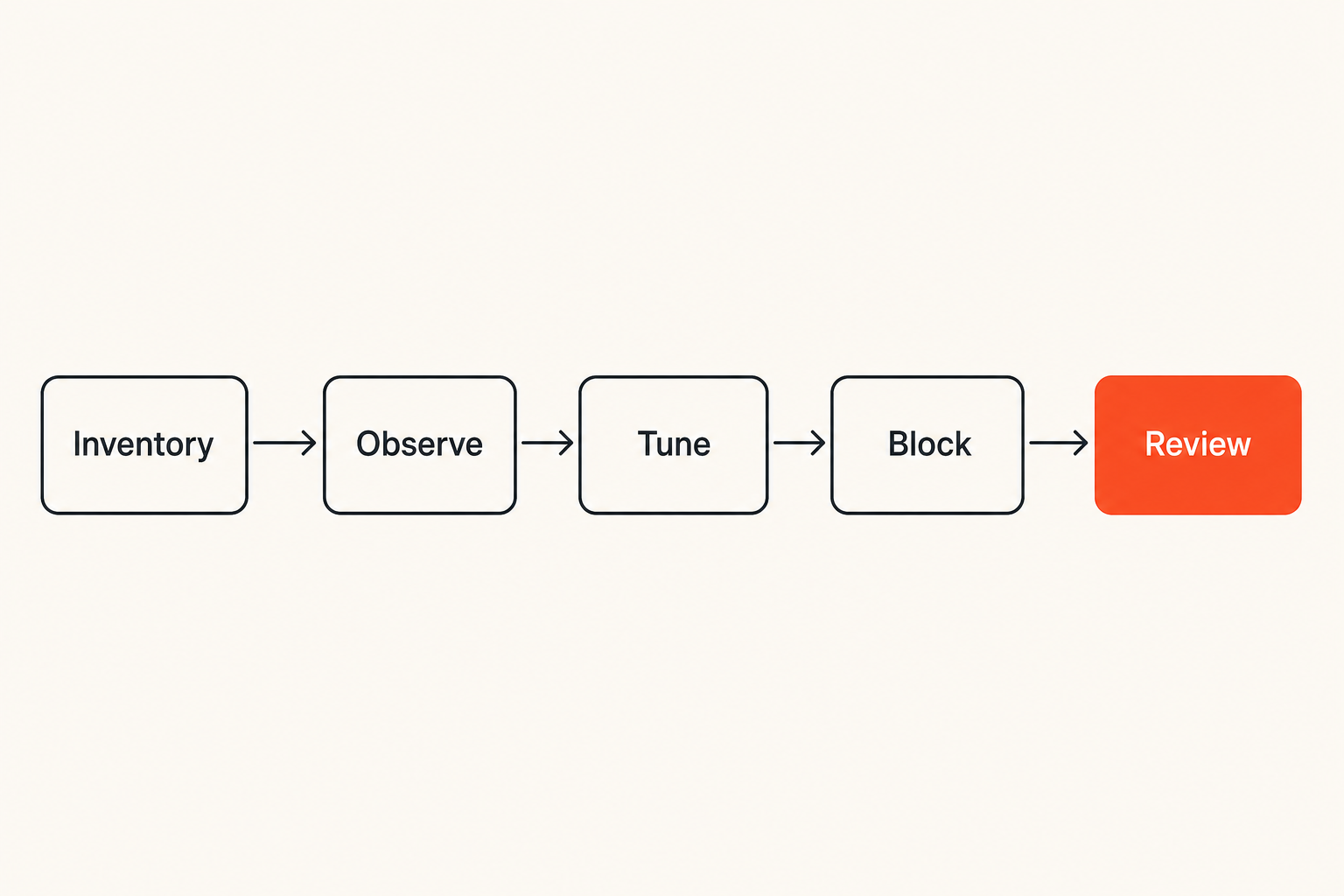
A practical implementation sequence
What breaks in practice is not the scanner. It is the rollout. Teams turn on blocking mode across hundreds of repositories, discover years of accumulated issues, then switch everything to warn-only forever.
Use a staged installation workflow instead:
- Inventory repositories, workflow files, package ecosystems, and release paths.
- Classify repositories by criticality: production deployers, libraries, internal tools, experiments.
- Install checks in observation mode for a short baseline period.
- Review findings with repo owners and remove obvious false positives.
- Turn on blocking for high-confidence rules first.
- Add exception expiry and owner approval.
- Store findings and decisions as build artifacts or issue comments.
- Review coverage monthly and add rules as confidence improves.
This sequence avoids the usual trap: installing a system that is technically active but socially rejected.
Configuration that survives real repositories
The configuration should be boring, versioned, and close to the code. If a repo needs different policy, make that visible. Hidden central configuration is useful for baseline enforcement, but repo-local policy makes reviews easier.
A minimal GitHub Actions pattern looks like this:
name: supply-chain-security
on:
  pull_request:
    paths:
      - .github/workflows/**
      - package.json
      - package-lock.json
      - requirements.txt
      - pyproject.toml
      - Cargo.toml
      - Cargo.lock
      - go.mod
      - composer.json
permissions:
  contents: read
  pull-requests: write
jobs:
  scan:
    runs-on: ubuntu-latest
    steps:
      - uses: actions/checkout@v4
      - name: Run CI/CD and package checks
        uses: vu1nz/action@v1
        with:
          mode: pr
          fail-on: high
The exact action and policy will vary, but the shape matters: limited permissions, PR-scoped execution, dependency and workflow paths, clear failure criteria.
Related reading from our network: product teams solving shipping reliability run into a similar operating-model issue, where workflow beats slogans; this piece on tops products in 2026 is outside security but relevant to building repeatable delivery systems.
What breaks when installation is done badly
Alert noise without triage context
A noisy installed system is worse than a missing one because it trains the organization to ignore security output. In CI/CD, noise usually comes from three sources:
- Findings that do not explain exploitability in pipeline context.
- Duplicate alerts across tools with different labels.
- Warnings on historical issues unrelated to the current change.
Good triage context answers: what changed, why it matters, what token or secret is exposed, whether the finding is blocking, and who can fix it.
If a finding says insecure workflow detected, it is not enough. If it says pull_request_target workflow checks out attacker-controlled code and has contents: write, now the reviewer knows what to do.
Bypasses through trusted automation
CI/CD bypasses often look legitimate. A reusable workflow calls another workflow. A bot opens a dependency PR. A release job runs only on tags. A maintainer re-runs a failed job from a fork. Each of these can be safe or unsafe depending on trust boundaries.
The installation must account for automation identity:
- Which bot created the PR?
- Which actor triggered the workflow?
- Does rerun behavior change privileges?
- Are secrets available to this event?
- Can untrusted input affect a privileged step?
The mistake teams make is assuming trusted automation stays trusted no matter what data flows into it. That is exactly where many CI/CD attacks live.
What works: opinionated defaults and evidence
Store results as build artifacts
If the security system only posts to chat, you lose evidence. Chat scrolls away. People edit messages. Context disappears during incident review.
Store machine-readable and human-readable results with the build:
- SARIF or JSON for tooling.
- Markdown summaries for reviewers.
- Policy decisions and exception IDs.
- Package delta summaries.
- Workflow risk summaries.
This matters when a suspicious release appears later. You want to know whether the risky dependency entered through a reviewed PR, whether a gate fired, who approved an exception, and what the scanner saw at the time.
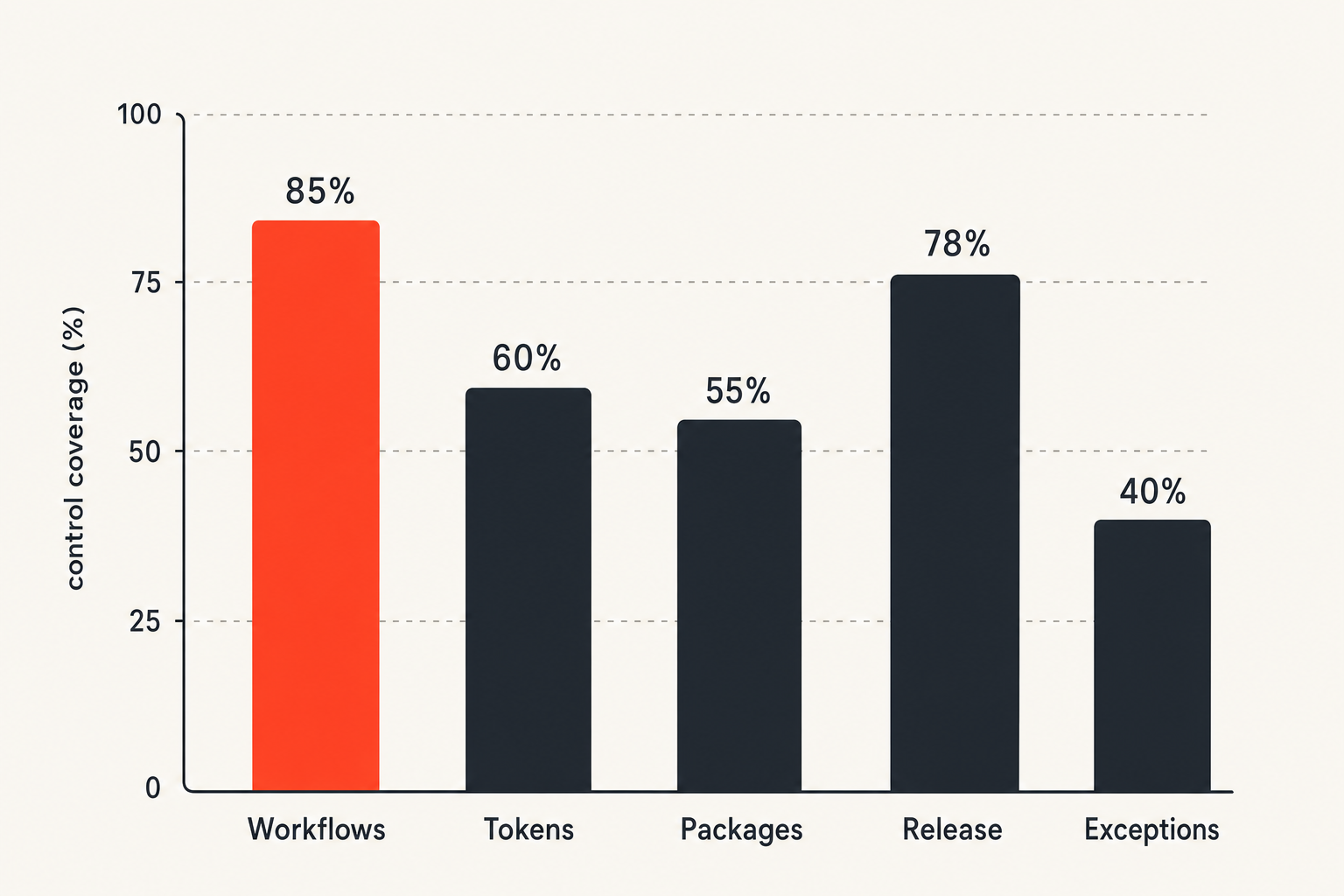
Measure control coverage, not scanner count
Many teams measure security installation by tool count. That is backwards. Ten scanners that all evaluate the same dependency manifest do not protect a release workflow that can publish from an unreviewed tag.
Measure coverage by control objective:
| Objective | Coverage question | Evidence |
|---|---|---|
| Workflow safety | Are risky workflow changes reviewed before merge? | PR check result |
| Token minimization | Are write permissions justified? | permission diff |
| Package intake | Are new dependencies inspected? | dependency delta |
| Release integrity | Are artifacts built from reviewed commits? | provenance or build record |
| Exception hygiene | Do bypasses expire? | exception log |
The practical question is not how many tools are installed. It is whether the system covers the trust transitions attackers actually use.
What fails: tool sprawl and checkbox compliance
Disconnected dashboards
Disconnected dashboards create the illusion of coverage. Security sees a red number. Developers see a failed job. Platform sees nothing. Leadership sees a compliance report. Nobody sees the same workflow.
A security system installation should reduce the number of places a decision can hide. Findings should appear where the change is being reviewed, then flow into ticketing or incident response only when they require tracking beyond the PR.
This is especially important for security researchers and architects. If you cannot reconstruct the decision path, you cannot distinguish between tool failure, policy failure, and human override.
Security reviews after merge
Post-merge review is sometimes necessary, but it is expensive and politically weak. After merge, the team has already paid the context-switching cost. The release may already be built. The dependency may already be cached. The workflow may already have run with elevated credentials.
Pre-merge review changes the economics. The author is still present. The diff is small. The fix is local. The business impact is usually lower.
Related reading from our network: even non-security coordination systems have this same routing problem, and this guide on running a local community network is a useful analogy for trust, follow-up, and ownership loops.
Validation and response after installation
Test with controlled failures
Do not trust an installed security system until you have watched it fail safely. Create controlled test cases:
- Add a workflow with contents: write where only read is needed.
- Reference a third-party action by a mutable tag.
- Add a dependency with suspicious install scripts in a test repo.
- Attempt to access secrets from an unsafe event context.
- Modify a release workflow and confirm required reviewers trigger.
The goal is not theater. The goal is to prove that the control triggers, the message is understandable, the owner receives it, and the bypass path is logged.
Practical rule: A security control that has never been tested is a belief, not an installation.
Wire findings into incident workflow
Some findings are not normal code review issues. If a PR adds a suspicious package that appears designed for credential theft, or a workflow change attempts to exfiltrate tokens, treat it as potential compromise.
Define escalation criteria:
- Evidence of secret access or exfiltration.
- Obfuscated install scripts or postinstall network calls.
- Workflow changes that alter release or signing behavior.
- Unknown actor behavior on a protected repository.
- Repeated attempts to bypass the same control.
That changes the conversation from please fix this lint issue to we may have an active supply-chain intrusion. The installed system should support that escalation without improvisation.
Where vu1nz.com fits in the stack
Drop-in scanning for GitHub Actions and packages
vu1nz.com is built for teams that want CI/CD and package supply-chain checks inside the pull request, not three dashboards away from it. The vu1nz GitHub Action scans workflow security issues and newly added packages so reviewers can see risky automation and dependency changes before they merge.
That is the product-fit argument: not replace every SAST, SCA, SIEM, or runtime tool. Put a focused control at the point where pipeline and package risk enters the system.
The installation model is intentionally small:
- Add one workflow.
- Run checks on pull requests.
- Review CI/CD and package findings in context.
- Fail builds only on the rules you are ready to enforce.
- Keep the evidence attached to the change.
When to use a focused scanner
Use a focused scanner when the risk is specific and high leverage. GitHub Actions misconfiguration and package intake are good examples. They are narrow enough for precise checks, but important enough that generic code scanning often does not provide the right context.
A focused scanner is not a security program. It is a control. The value comes from where it sits in the workflow, how clearly it reports risk, and whether it helps developers fix the issue without opening a separate investigation.
If your current security system installation already includes broad SCA and code scanning, the question is whether those tools understand CI/CD trust boundaries. If they do not, add a control that does.
Closing: make security system installation part of delivery
The operating principle
Security system installation for CI/CD is not finished when the action runs green. It is finished when unsafe changes are caught at the right trust boundary, routed to the right owner, backed by evidence, and validated with controlled failures.
The mistake teams make is trying to bolt security onto delivery after delivery is already designed. The better pattern is to treat the pipeline as part of the system being defended.
That means pull request gates, scoped tokens, package delta review, release controls, exception expiry, evidence retention, and incident escalation all belong in the same architecture.
In 2026, security system installation is not about buying another dashboard. It is about making the secure path the normal path for software changes.
Try vu1nz.com
vu1nz.com is for security engineers and DevSecOps teams who need to defend CI/CD pipelines and software supply chains from modern attacks. Try vu1nz.com.
Catch the next supply-chain attack on the PR that adds it.
14-day free trial · no card required