A release is failing, the on-call engineer opens a screen share, and three people watch a terminal scroll through build logs. Someone asks to see the runner config. Someone else asks to inspect the deployment token. The team is trying to move fast, but the session has quietly become a privileged access path into the software supply chain.
That is why screen sharing CI/CD security matters in 2026. Remote collaboration is not an edge case anymore. It is how teams debug broken pipelines, review suspicious workflow changes, investigate compromised packages, and coordinate emergency rollbacks.
Teams think the problem is whether the meeting tool is encrypted. The real problem is whether screen sharing bypasses the controls you built around your CI/CD environment.
The practical question is not, can people share their screen? It is, what pipeline state, credentials, logs, artifacts, approvals, and production controls become visible or controllable when they do?
Table of contents
- Screen sharing CI/CD security is an access-control problem
- Map what a screen share can expose
- Design collaboration zones around pipeline risk
- Control remote input before it controls your release
- Build a safe screen sharing workflow for CI/CD incidents
- Harden the CI/CD surfaces people share
- Instrument sessions as part of the security workflow
- What breaks when teams implement this badly
- Screen sharing CI/CD security checklist
- Where vu1nz.com fits
Screen sharing CI/CD security is an access-control problem
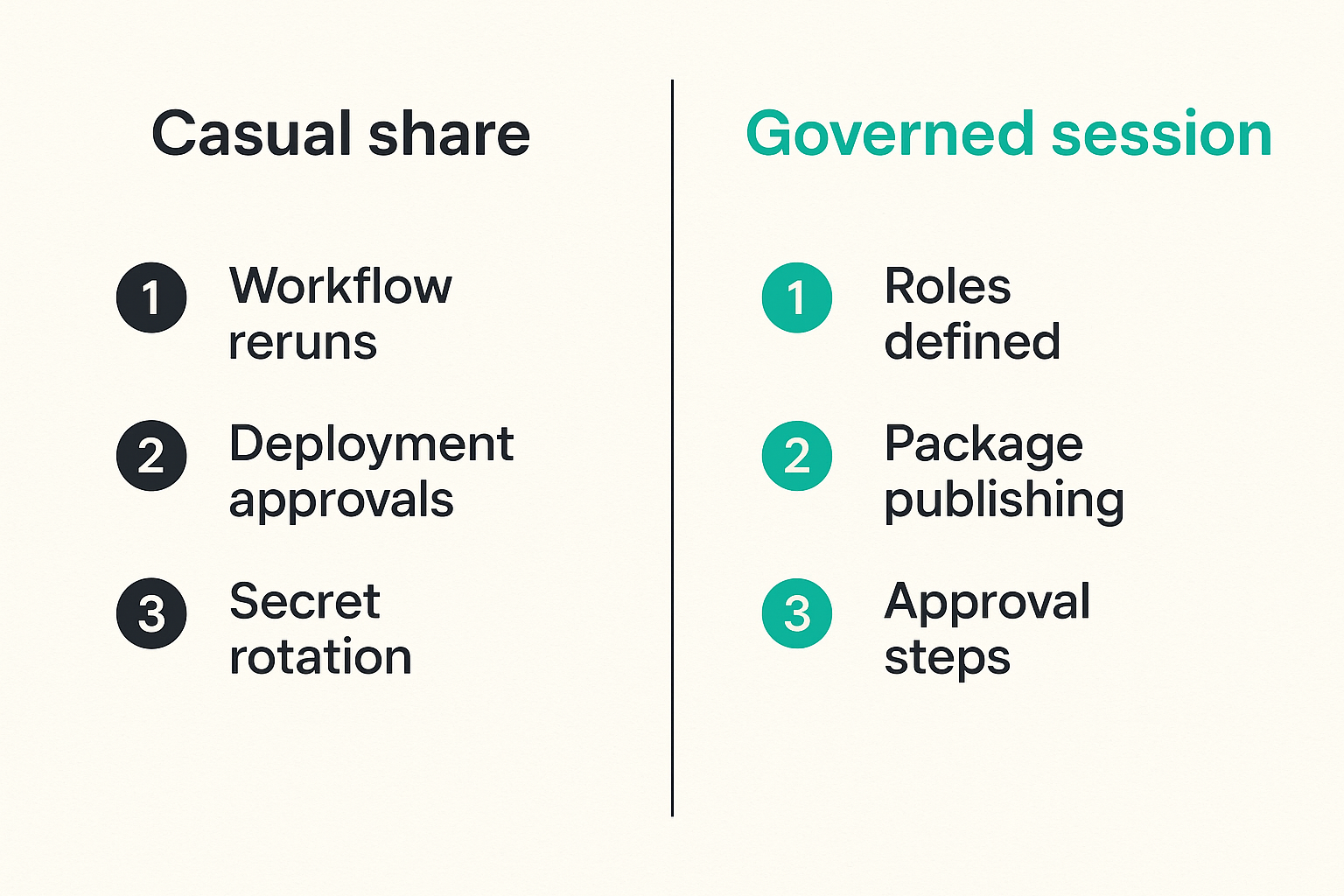
Why collaboration becomes privileged access
Screen sharing looks harmless because it is usually framed as visibility. In practice, it often includes narration, copy-paste, terminal prompts, browser tabs, password-manager popups, cloud console state, GitHub Actions logs, deployment approvals, and human decisions made under time pressure.
The mistake teams make is treating the session as outside the system. It is not. If an engineer shares a terminal where they can rerun a workflow, approve a deployment, rotate a secret, or publish a package, the session is now part of the control plane.
A useful way to think about it is this: CI/CD permissions determine what an account can do, but screen sharing determines who can observe, influence, or sometimes directly operate that account during a sensitive moment.
Practical rule: Treat every screen share involving CI/CD as a temporary extension of privileged access, even when no one grants remote keyboard control.
What changes when CI/CD is the target
Traditional endpoint screen sharing risk is about desktop exposure. CI/CD risk is different because the shared screen may show systems that can alter the software supply chain.
The sensitive assets are not only passwords. They include workflow definitions, signing keys, package publishing permissions, artifact provenance, release tags, deployment environments, organization settings, runner labels, repository secrets, branch protection behavior, and bypass paths that only appear during a live incident.
That changes the conversation. The security model must cover what participants can see, what they can ask the operator to do, what they can capture, and what mistakes become possible when debugging moves faster than review.
Map what a screen share can expose
Secrets, tokens, and masked values
Most teams know not to paste production secrets into chat. Fewer teams inspect what their pipeline reveals indirectly. Logs can leak partial tokens, environment names, internal hostnames, registry URLs, cloud account IDs, dependency paths, and failure messages that expose how a secret is used.
Masked values are not a complete control. A token might be hidden in one log line but visible in a command history, stack trace, local env dump, test fixture, Terraform plan, package manager config, or browser autofill prompt. During a screen share, the leak does not need to persist in a file to become useful to an attacker. It only needs to be seen, copied, screenshotted, or remembered.
For guest contributors like the team at pairux.com, the operational reality is familiar: collaboration tools are useful precisely because they remove friction, and that same friction removal can collapse security boundaries if the workflow is not designed.
Build context, branches, and release intent
Screen sharing can reveal information that is not a credential but still matters. An attacker watching a release debug session may learn which branch will be promoted, which flaky test is ignored, which manual approval is treated as a rubber stamp, or which package version is about to be trusted.
In supply chain security, timing and intent are valuable. If a malicious contributor knows a hotfix branch is moving through relaxed controls, that is a better window for abuse than a normal release. If a dependency maintainer account is under investigation, seeing the internal triage path can help an attacker adapt.
Practical rule: Classify screen-shared CI/CD information by operational value, not just by whether it contains a literal secret.
Design collaboration zones around pipeline risk
Low-risk viewing versus high-risk operation
Not every screen share needs the same ceremony. Watching a read-only dashboard is different from sharing a terminal with deploy permissions. Reviewing a public workflow file is different from opening repository secrets. The control should match the risk.
| Collaboration zone | Typical content | Primary risk | Practical control |
|---|---|---|---|
| Read-only review | Workflow YAML, public logs, diagrams | Misinterpretation, oversharing context | Use sanitized views and issue links |
| Investigation | Failed jobs, dependency traces, runner state | Secret exposure, attacker learning | Limit attendees and redact logs |
| Privileged operation | Releases, rotations, approvals, rollback | Unauthorized action, social pressure | Require second-channel approval |
| Emergency response | Compromise triage, live containment | Evidence loss, panic changes | Assign roles and record decisions |
The mistake teams make is using one collaboration pattern for all four. A normal standup screen share pattern does not belong in a package compromise response.
Separate investigation from execution
A better pattern is to separate observing from acting. Use screen sharing to inspect evidence, discuss hypotheses, and agree on next steps. Then perform privileged changes through the normal workflow: pull request, approval gate, break-glass process, or incident command channel.
This is not bureaucracy for its own sake. It prevents a meeting from becoming an unreviewed deployment path. If someone says, just click approve while we are all here, that is a signal the screen share is bypassing your release governance.
What breaks in practice is ownership. During a live call, the person driving the screen becomes the de facto operator, even if they are not the right approver. Design the workflow so the right identity performs the action in the right system with the right audit trail.
Control remote input before it controls your release
Remote control is not the same as screen sharing
Remote control changes the risk class. Viewing a pipeline is one thing. Letting another participant type into a shell, browser console, cloud account, package registry, or deployment UI is another.
Many teams treat remote control as a convenience feature. In CI/CD security, it should be treated like delegated admin access. If a participant can click rerun on a privileged workflow, paste a command into a terminal, or change a setting in a repository, your audit trail may attribute the action to the host while the intent came from someone else.
A basic policy is simple: remote control should be disabled by default for CI/CD workstations and only enabled for explicitly approved support cases. Even then, the controlled environment should be constrained.
Approval gates should survive the session
The core test is whether your normal security gates still matter during a screen share. Branch protection, required reviews, deployment approvals, environment protection rules, signing requirements, artifact verification, and package publishing controls should not be relaxed because everyone is on a call.
Practical rule: If a control can be bypassed by asking the screen sharer to click something during a meeting, it is not a strong CI/CD control.
For GitHub Actions and similar systems, this means protected environments should require named approvers, not just whoever is driving the incident call. Production secrets should be scoped to environments and unavailable to arbitrary workflows. Self-hosted runners should not expose broad network reach because someone needs to debug a failing job.
Build a safe screen sharing workflow for CI/CD incidents
The minimum viable workflow
Screen sharing CI/CD security becomes much easier when teams have a standard incident workflow. It does not need to be heavyweight. It needs to remove ambiguity before the stressful part begins.
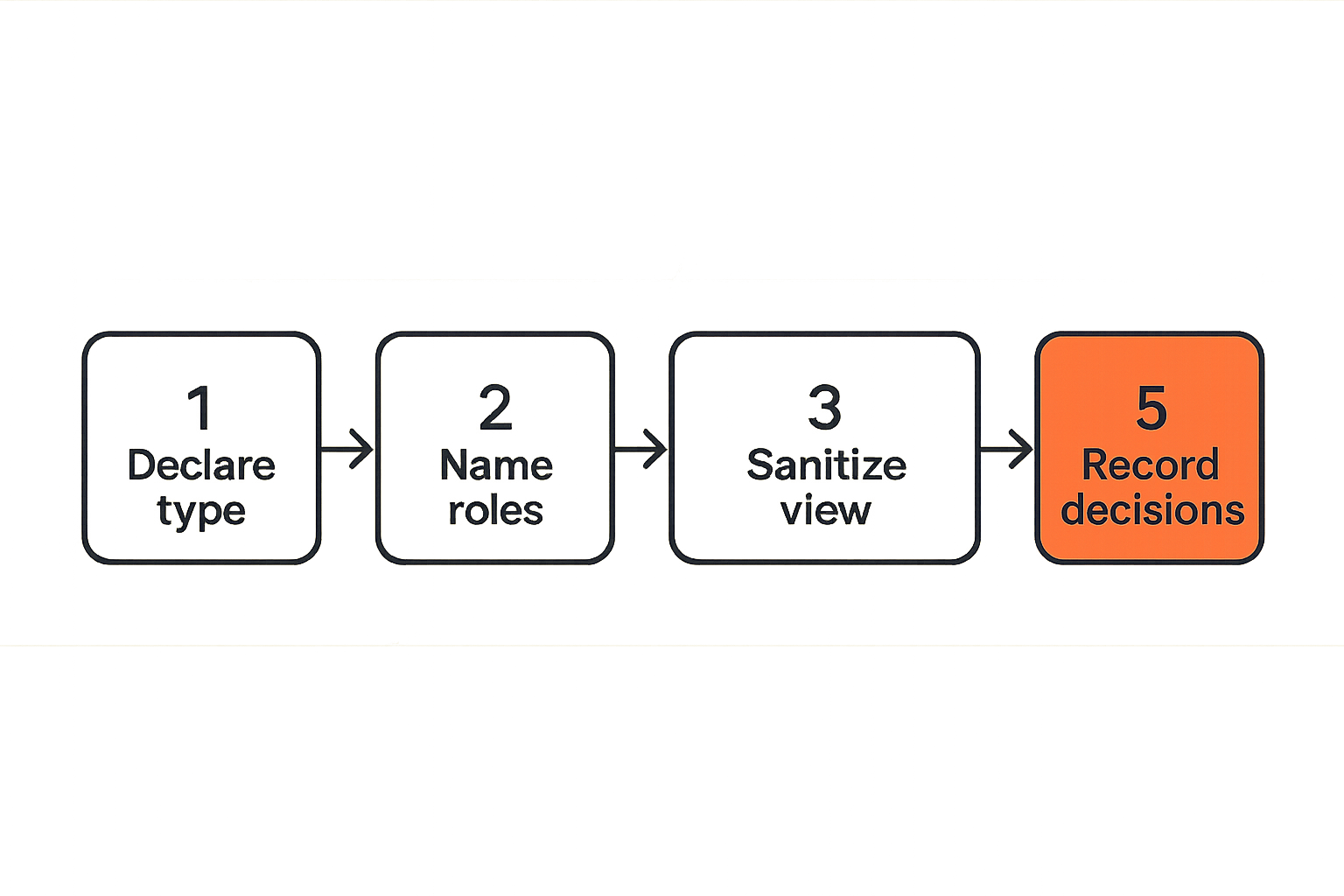
A practical implementation sequence looks like this:
- Declare the session type. Is this read-only review, investigation, privileged operation, or emergency response?
- Name the driver. One person shares. One person operates. Those may be different roles depending on risk.
- Limit attendees. Invite people with a reason to observe the CI/CD state. Do not turn sensitive pipeline debugging into an open office hour.
- Sanitize before sharing. Close unrelated tabs, lock password managers, clear terminal scrollback, and open the exact views needed.
- Use read-only views first. Prefer logs, workflow files, dashboards, and ticketed evidence before consoles that can mutate state.
- Move privileged actions back into controlled systems. Approvals, rotations, releases, and rollback commands should leave their normal audit trail.
- Write down decisions. Capture what was observed, what changed, who approved it, and what follow-up validation is required.
That sequence sounds basic. In production, it prevents most of the avoidable damage.
Session roles and handoffs
For higher-risk sessions, define roles explicitly. The driver shares context. The operator performs approved actions. The verifier checks results. The incident lead decides sequencing. The scribe captures decisions.
This avoids the common pattern where five senior people talk over each other while one engineer frantically clicks through consoles. It also makes handoffs safer. If the operator changes, the session pauses and confirms what permissions are active.
For supply chain incidents, this matters because the team may move across repository settings, package registry controls, identity provider logs, cloud deployment state, and runner infrastructure. A role model keeps the session from becoming a wandering tour of sensitive systems.
Harden the CI/CD surfaces people share
Logs and terminal output
Logs are the first surface to harden because they are the most commonly shared. Start by reducing what the pipeline emits. Do not print entire environment objects. Avoid verbose package manager auth output. Treat debug flags as privileged. Scrub tokens before they reach job output.
For GitHub Actions, review workflow steps that echo context objects or shell variables. A risky pattern often looks like this:
- name: debug env
  run: env | sort
A safer pattern is to print allowlisted diagnostic values:
- name: debug build context
  run: |
    echo GITHUB_REF=$GITHUB_REF
    echo GITHUB_SHA=$GITHUB_SHA
    echo RUNNER_OS=$RUNNER_OS
Even allowlisted output should be reviewed. Branch names, actor names, runner labels, and internal paths can still carry operational context.
Dashboards, consoles, and package registries
Browser-based tools create a different class of exposure. Repository settings can reveal branch protection gaps. Package registries can show publish permissions. Cloud consoles can expose account topology and production identifiers. Identity dashboards can reveal group names and privileged users.
Use dedicated browser profiles for CI/CD administration. Keep consumer accounts, unrelated SaaS tabs, and personal password managers out of the shared workspace. If possible, use read-only security dashboards for collaboration and reserve mutable consoles for the operator.
The practical question is whether the screen being shared is optimized for collaboration or administration. Those are not always the same surface.
Instrument sessions as part of the security workflow
What to log without recording everything
Recording every sensitive session sounds attractive until it creates a new archive of secrets, internal topology, and incident details. Many teams do not need full video retention. They need enough metadata and decision evidence to reconstruct what happened.
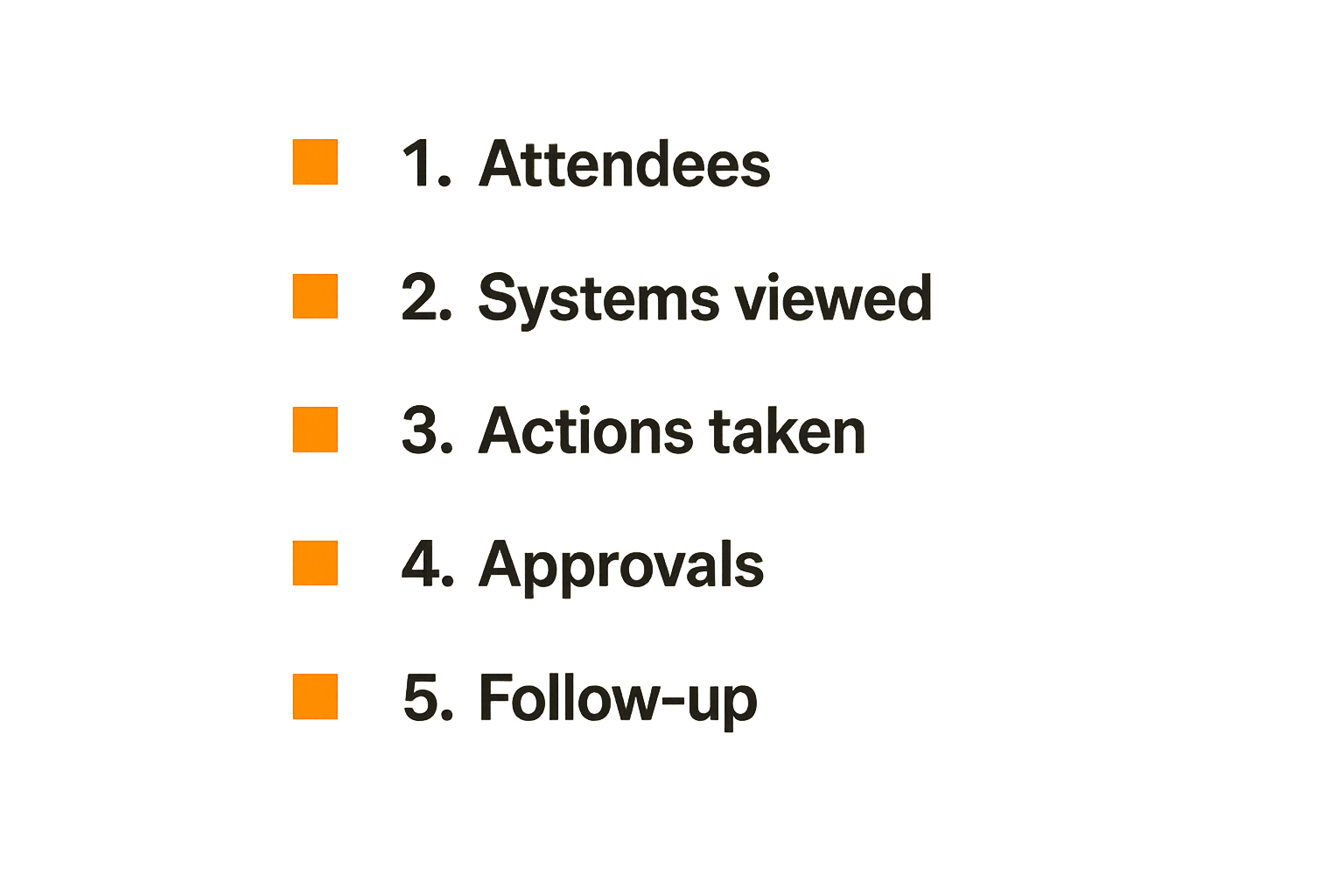
Useful session records include the session type, start and end time, attendees, driver, systems viewed, privileged actions proposed, privileged actions executed, approvals, related pull requests, related incident tickets, and post-session validation tasks.
Do not rely on meeting chat as the system of record. Chat is noisy, hard to query, and often retained under a different policy than security evidence. Link the session to your incident system or change management record.
Evidence that helps an investigation
Good evidence answers a few concrete questions: what did we know, who saw it, what did we decide, what changed, and how did we validate the result?
For CI/CD and supply chain incidents, include artifact hashes, workflow run IDs, commit SHAs, package versions, runner identifiers, deployment environment names, and approval references. These are better than vague notes like checked logs or looked fine.
A useful session summary might be:
Session type: investigation
Driver: build-security-oncall
Systems viewed: GitHub Actions run 8821, npm package audit logs, runner group prod-linux
Finding: release job pulled unexpected transitive dependency version
Action: no deployment approved during session
Follow-up: pin dependency, rotate package token, review runner cache
That level of detail supports later detection engineering and root cause analysis without turning the screen share itself into a secret store.
What breaks when teams implement this badly
The common failure modes
The common failure modes are predictable. They usually come from treating collaboration as informal while treating CI/CD as formal.
First, secrets leak through debug output. Someone shares a failing job, scrolls too far, and exposes values that were never meant for a broad audience. Second, remote control obscures accountability. The audit log says one engineer performed an action, but the action was directed by someone else. Third, emergency calls become approval bypasses. Everyone agrees verbally, but no durable approval exists. Fourth, recordings create a second data breach surface. Fifth, broad attendance gives too many people visibility into release weaknesses.
What breaks in practice is not just confidentiality. Integrity breaks too. A rushed command can publish the wrong package, approve the wrong environment, rerun an unsafe workflow, or destroy evidence before investigators understand the compromise.
What works and what fails
| Approach | What works | What fails |
|---|---|---|
| Meeting-only policy | Easy to explain | Does not touch CI/CD permissions or logs |
| Tool encryption focus | Protects transport | Ignores what is shown and who can act |
| Full recording | Captures context | Stores sensitive data and increases review burden |
| Read-only collaboration surfaces | Reduces accidental changes | Requires upfront dashboard design |
| Role-based incident workflow | Preserves ownership and auditability | Needs rehearsal before a real incident |
| Protected deployment gates | Keeps releases governed | Fails if break-glass is informal |
The best pattern is layered. Harden what appears on screen, constrain who participates, preserve CI/CD gates, and capture decisions outside the meeting tool.
Screen sharing CI/CD security checklist
Controls to implement first
Start with controls that reduce high-probability mistakes. You do not need a six-month program to improve screen sharing CI/CD security.
- Disable remote control by default on workstations used for CI/CD administration.
- Create a sanitized browser profile for repository, cloud, registry, and pipeline work.
- Remove broad environment dumps and unsafe debug output from workflows.
- Require protected environments and named approvers for production deployments.
- Scope CI/CD secrets to environments and least-privilege jobs.
- Use read-only dashboards for investigation whenever possible.
- Define incident session roles before the next compromise or release outage.
- Record decisions in the incident or change system, not only in meeting chat.
Practical rule: Optimize for fewer sensitive pixels on screen, fewer people in the session, and fewer actions performed outside normal CI/CD controls.
Review questions for security teams
Security teams should review screen sharing as part of pipeline threat modeling. Ask concrete questions:
- Which CI/CD views expose secrets, partial secrets, or sensitive topology?
- Who is allowed to share production deployment consoles?
- Can remote control be used on privileged engineering workstations?
- Are emergency release approvals durable and attributable?
- Are recordings retained, searchable, and protected like sensitive evidence?
- Can a screen share cause a package publish, deployment, rollback, or runner change without a separate approval trail?
- Do logs expose enough detail for attackers to tune supply chain attacks?
If the answer is unclear, assume the workflow is relying on trust and habit rather than architecture.
Where vu1nz.com fits
When the platform earns its place
For DevSecOps teams, the useful product is not another dashboard that creates more alerts. The useful product is one that helps engineers test the actual paths attackers use: CI/CD permissions, workflow assumptions, package trust, runner behavior, and supply chain blast radius.
That is where a site like vu1nz.com fits the workflow. The value is practical security testing guidance that helps teams validate whether their pipeline controls survive real operating conditions, including remote collaboration during incidents and releases.
Screen sharing CI/CD security is not solved by banning screen shares. Teams still need to debug, review, and respond together. The goal is to make collaboration compatible with least privilege, auditability, and release integrity.
Try vu1nz.com
For practical CI/CD and software supply chain security research, testing guidance, and vulnerability-focused engineering workflows, Try vu1nz.com.
Catch the next supply-chain attack on the PR that adds it.
14-day free trial · no card required