Arrow security sounds like a product category, but in CI/CD it is usually a workflow failure. A pull request points at a build. A build points at an artifact. An artifact points at production. Every arrow transfers trust.
Teams think the problem is vulnerable code. The real problem is uncontrolled movement between identities, workflows, packages, artifacts, and deployment environments.
That changes the conversation. You are not only asking whether a dependency has a CVE. You are asking whether an attacker can turn a small permission, a poisoned package, or a workflow edit into a signed release.
The practical question is not whether you have enough scanners. It is whether your CI/CD architecture understands the arrows attackers actually use.
Table of contents
- Why Arrow Security Matters in CI/CD
- Map the Arrows Before You Buy Tools
- Arrow Security Controls That Actually Reduce Risk
- Build a Practical Arrow Security Workflow
- What Breaks When Arrow Security Is Implemented Badly
- What Works and What Fails
- Package Arrows Are Different From Code Arrows
- Runtime Feedback Should Close the CI/CD Loop
- Ownership, Exceptions, and Audit Trails
- Where vu1nz.com Fits in an Arrow Security Architecture
Why Arrow Security Matters in CI/CD
Arrow security is about the direction of trust. In a modern delivery system, risk does not stay in one place. It moves from repository settings to workflow execution, from workflow execution to package installation, from package installation to artifact creation, and from artifact creation to deployment.
The mistake teams make is treating each control as a local check. Code scanning is local. Dependency scanning is local. Branch protection is local. But the attacker is not local. The attacker follows the arrow that gives the next privilege jump.
A useful way to think about it is this: every arrow should have an owner, a policy, a validation step, and a failure mode. If one of those is missing, you do not have a security boundary. You have hope.
The arrow is the trust transition
In a CI/CD pipeline, an arrow is any transition where one object causes another object to become trusted. Common examples include:
- A contributor opens a PR that triggers a workflow.
- A workflow installs a package from npm, PyPI, Cargo, RubyGems, Go modules, or Composer.
- A workflow receives a token and writes to a registry.
- A build produces an artifact that is promoted to staging.
- A deployment job assumes a cloud role.
- A maintainer approves a workflow run from a fork.
None of these are automatically bad. They are how delivery works. What breaks in practice is that teams document the boxes and ignore the arrows between them.
Practical rule: if a transition can create, modify, sign, publish, or deploy something, treat that transition as a security boundary.
Why this is a 2026 problem
CI/CD used to be mostly glue. Now it is the control plane for software production. GitHub Actions, package registries, container registries, cloud identities, AI code assistants, and release automation all meet there.
That makes CI/CD attractive because it compresses privilege. A single workflow misconfiguration can expose secrets, publish a poisoned artifact, or let untrusted code run in a trusted context. A single malicious package can execute during install and reach environment variables before your application ever starts.
Related reading from our network: teams building SOC workflows face similar ownership and validation problems in cloud exposure management, as described in Security Public Storage: A SOC Architecture Guide for 2026.
Map the Arrows Before You Buy Tools
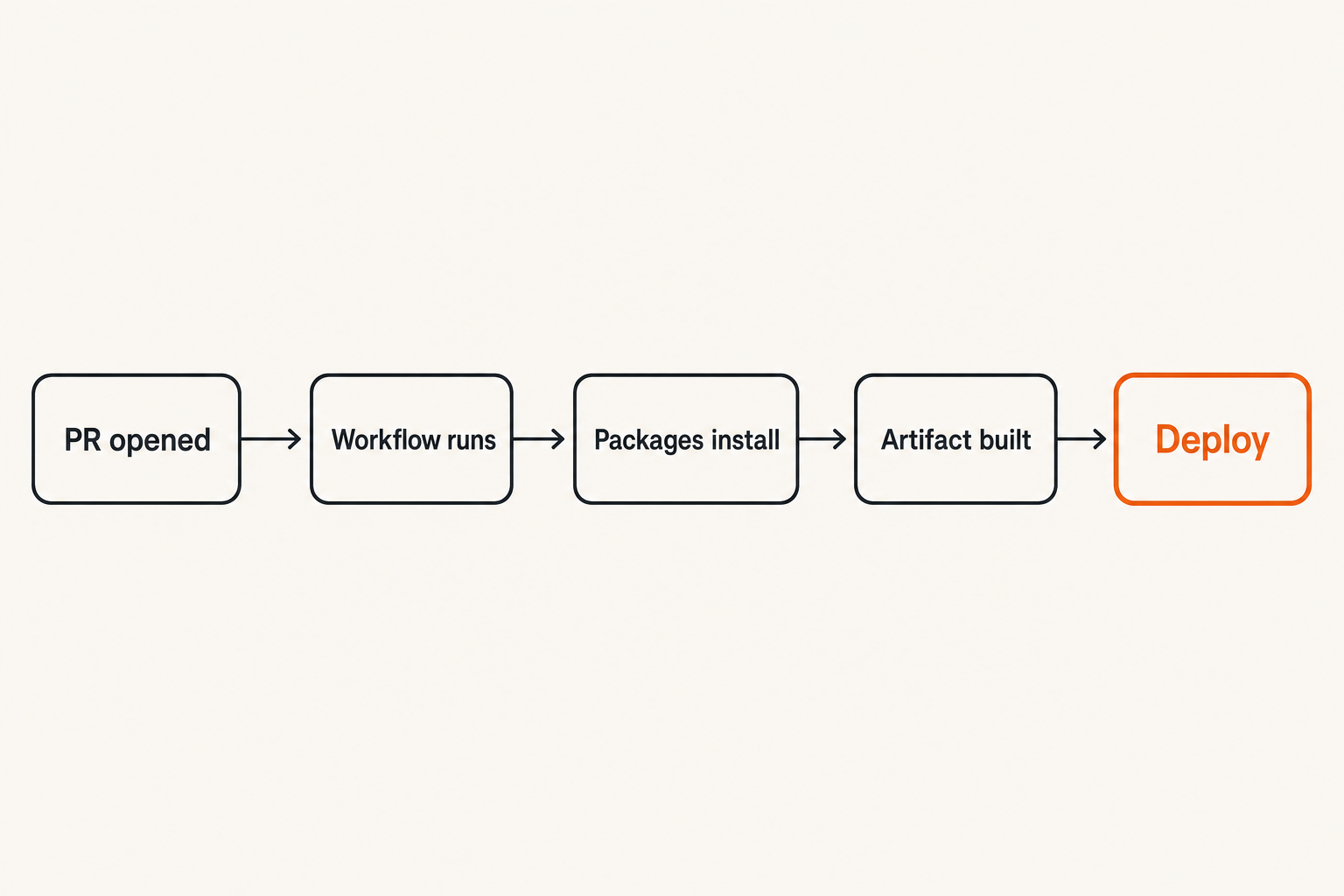
Buying another scanner before mapping trust transitions usually creates more alerts, not more security. The practical question is: which arrows let untrusted input become trusted output?
Start with a simple inventory. Do not begin with a diagram of every service. Begin with the paths that can change production. You want to know where code enters, where automation runs, where dependencies are resolved, where artifacts are built, and where authority is granted.
Start with merge paths
Most CI/CD compromise paths begin near a merge path. That does not always mean the final merge button. It includes the surrounding automation:
- PR opened or branch updated.
- Workflow triggered by
pull_request,pull_request_target,workflow_run, or manual dispatch. - Dependencies installed.
- Tests, builds, or scripts executed.
- Artifacts uploaded.
- Status checks reported.
- Merge allowed.
- Release or deployment automation triggered.
Each step is an arrow. Each arrow should answer four questions:
- Who can trigger it?
- What code runs?
- What credentials are available?
- What output becomes trusted downstream?
If you cannot answer those questions quickly, the pipeline is already too implicit.
Separate identity arrows from artifact arrows
Identity arrows are about who or what gets authority. Artifact arrows are about what output is promoted. They are related, but they fail differently.
| Arrow type | Example | Primary risk | Control that usually helps |
|---|---|---|---|
| Identity arrow | Workflow gets GITHUB_TOKEN write scope | Untrusted code uses trusted token | Least privilege permissions and event discipline |
| Artifact arrow | Build output promoted to release | Poisoned artifact becomes official | Provenance, signing, isolated builders |
| Package arrow | New dependency installed in CI | Install script steals secrets | New-package review and behavior scanning |
| Deployment arrow | CI assumes cloud role | Pipeline becomes production admin | OIDC constraints and environment approvals |
| Human approval arrow | Maintainer approves fork run | Approval grants too much trust | Narrow approval semantics and protected environments |
The mistake teams make is writing one generic policy called CI security. That hides the different arrows. A better model is to split the controls by transition type.
Arrow Security Controls That Actually Reduce Risk
Arrow security controls are useful when they interrupt an attacker path without breaking normal delivery. They are not useful when they produce a thousand warnings that nobody owns.
The highest-value controls are usually boring: permissions, pinning, trigger design, dependency review, artifact integrity, and exception hygiene. They work because they sit directly on trust transitions.
Pin execution, not just packages
Most teams understand dependency pinning. Fewer teams pin CI execution with the same seriousness.
In GitHub Actions, a workflow can pull executable logic from third-party actions. If those actions are referenced by mutable tags, the workflow depends on whatever that tag means at execution time. That is an arrow from an external repository into your build system.
Prefer immutable references for third-party actions:
jobs:
  build:
    permissions:
      contents: read
    steps:
      - uses: actions/checkout@f43a0e5ff2bd294095638e18286ca9a3d1956744
      - uses: vendor/action-name@2f8c9b1c0a6a2d2a7d5e4f3b9c8a1e0d6c5b4a3f
This is not pretty. It is operationally annoying. But mutable execution references are a real supply-chain boundary. If you choose not to pin, make that an explicit risk decision rather than an accident.
Practical rule: any external code that runs inside CI should be treated like a production dependency, even if it lives in a workflow file instead of a package manifest.
Treat workflow files as privileged code
Workflow files decide what runs, when it runs, and which credentials are present. That makes them privileged code. A one-line workflow change can be more dangerous than a thousand-line application change.
A workflow security review should look for:
pull_request_targetused with checkout of untrusted head code.- Broad default token permissions.
- Secrets exposed to untrusted events.
- Shell interpolation of user-controlled values.
- Unpinned third-party actions.
- Artifact upload and download across trust boundaries.
- Release jobs triggered by unreviewed workflow output.
The vu1nz team has written previously about how a drop-in scanner can catch many of these workflow mistakes quickly in Ship Safer with vu1nz GitHub Actions, but the architectural point matters more than the tool: workflow files belong in your threat model.
Build a Practical Arrow Security Workflow
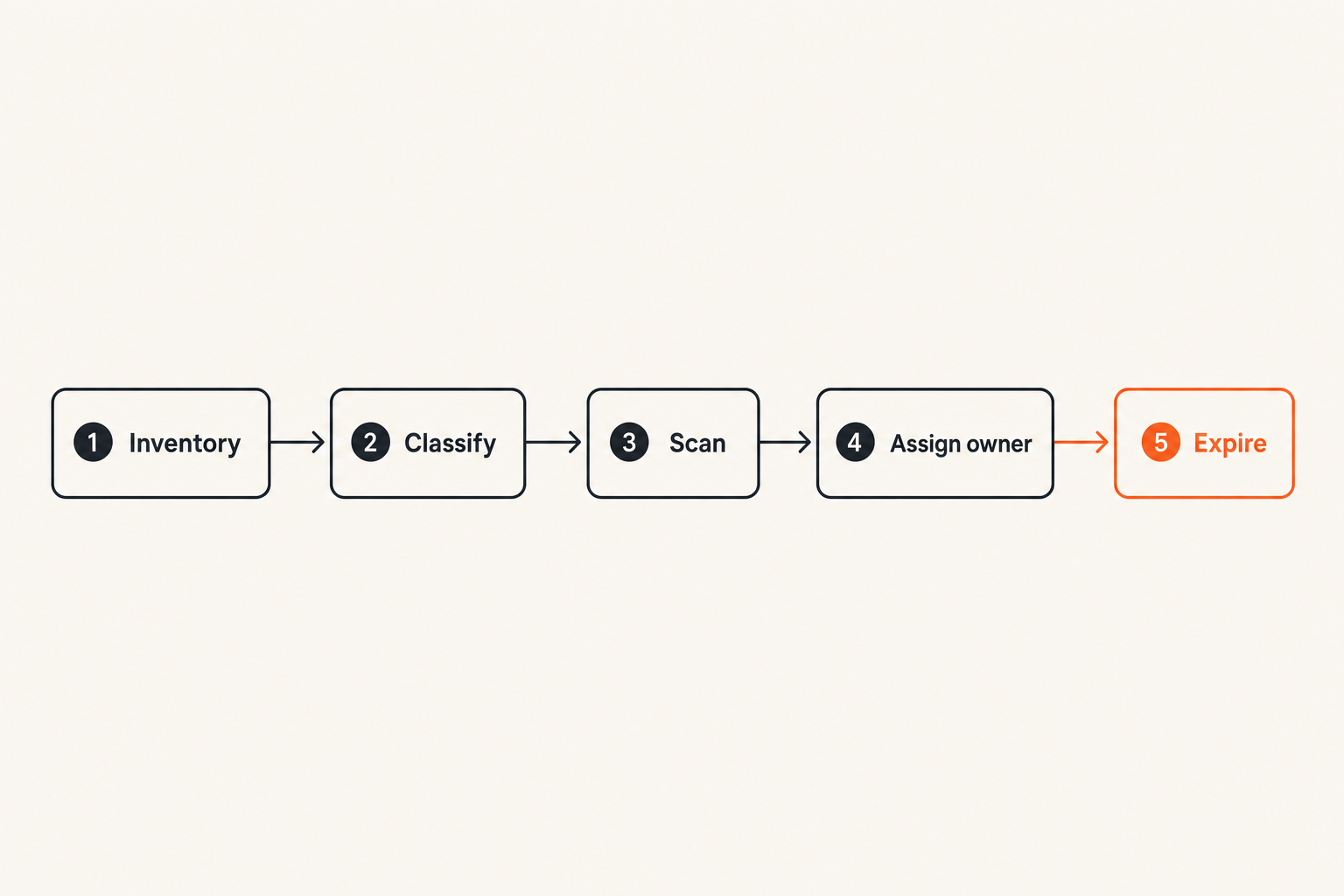
A useful arrow security workflow does not block every change. It blocks changes that modify trust transitions without review.
That changes the conversation with developers. You are no longer saying every dependency bump or workflow edit is suspicious. You are saying certain changes alter the security properties of the pipeline and need a different review path.
The review sequence
A practical implementation sequence looks like this:
- Inventory trust-changing files. Include workflow files, package manifests, lockfiles, Dockerfiles, release scripts, deployment manifests, and IaC that grants CI roles.
- Classify the arrow changed by the PR. Is it identity, package, artifact, deployment, or human approval?
- Run automated checks on the changed arrow. Do not run every heavy check on every PR if a narrower gate is enough.
- Attach findings to the PR with context. Show the line, the transition, and the likely impact.
- Require the right owner for risky transitions. A package owner can approve dependency risk. A platform owner should approve CI identity changes.
- Record exceptions with expiration. Temporary acceptance should not become permanent architecture.
- Feed production signals back into the model. If a dependency later behaves suspiciously, connect it to the PR that introduced it.
This sequence is intentionally simple. The hard part is not drawing the process. The hard part is preventing bypasses when delivery pressure increases.
A minimal GitHub Actions gate
A minimal gate should do three things: reduce token permissions, avoid dangerous event patterns, and scan changes that affect trust transitions.
name: arrow-security-gate

on:
  pull_request:
    paths:
      - '.github/workflows/**'
      - 'package.json'
      - 'package-lock.json'
      - 'requirements.txt'
      - 'pyproject.toml'
      - 'Cargo.toml'
      - 'Cargo.lock'
      - 'go.mod'
      - 'composer.json'

permissions:
  contents: read
  pull-requests: read

jobs:
  scan:
    runs-on: ubuntu-latest
    steps:
      - uses: actions/checkout@v4
      - name: Scan workflow and package arrows
        run: ./security/scan-pr-arrows.sh
In production, you may replace the shell script with a dedicated scanner, but the pattern matters: trigger on trust-changing files, run with minimal permissions, and report findings before merge.
Related reading from our network: streaming platforms deal with a comparable architecture problem where the UI is only the visible part and the real system is ingest, state, delivery, and reconciliation; see Streaming SaaS architecture for an adjacent example.
What Breaks When Arrow Security Is Implemented Badly
Bad arrow security creates friction without reducing attacker movement. You get long checklists, angry developers, stale exceptions, and dashboards that look busy while dangerous transitions remain unowned.
The failure mode is predictable: security teams focus on the easiest signal to collect instead of the transition that matters.
Noise becomes the new vulnerability
If every PR gets the same wall of dependency warnings, developers learn to ignore the scanner. If every workflow edit requires a week of review, teams route around the process. If every alert has the same severity, nothing is severe.
Noise is not harmless. In CI/CD, noise trains people to click through risk. That is especially dangerous around package changes because malicious packages often arrive without a CVE, without a long history, and without an obvious exploit signature.
Good findings should explain:
- What changed.
- Which arrow changed.
- Why the change increases risk.
- Whether the risk is exploitable in this repository.
- Who can approve or remediate it.
A finding that says vulnerable dependency found is weaker than a finding that says new install-time script added to a package introduced in this PR, executed in a workflow with registry publish credentials.
Ownership disappears at handoff points
The worst gaps often sit between teams. AppSec owns code scanning. Platform owns CI. SRE owns deployment. Developers own manifests. Procurement owns vendor risk. Nobody owns the arrow between them.
That is how unsafe transitions survive. The package scanner flags something but cannot see workflow credentials. The CI review sees a workflow edit but does not understand package install behavior. The deployment gate trusts any artifact from the build job.
Practical rule: assign ownership to transitions, not only systems. If two teams share an arrow, name the approver for each side before the incident.
What Works and What Fails
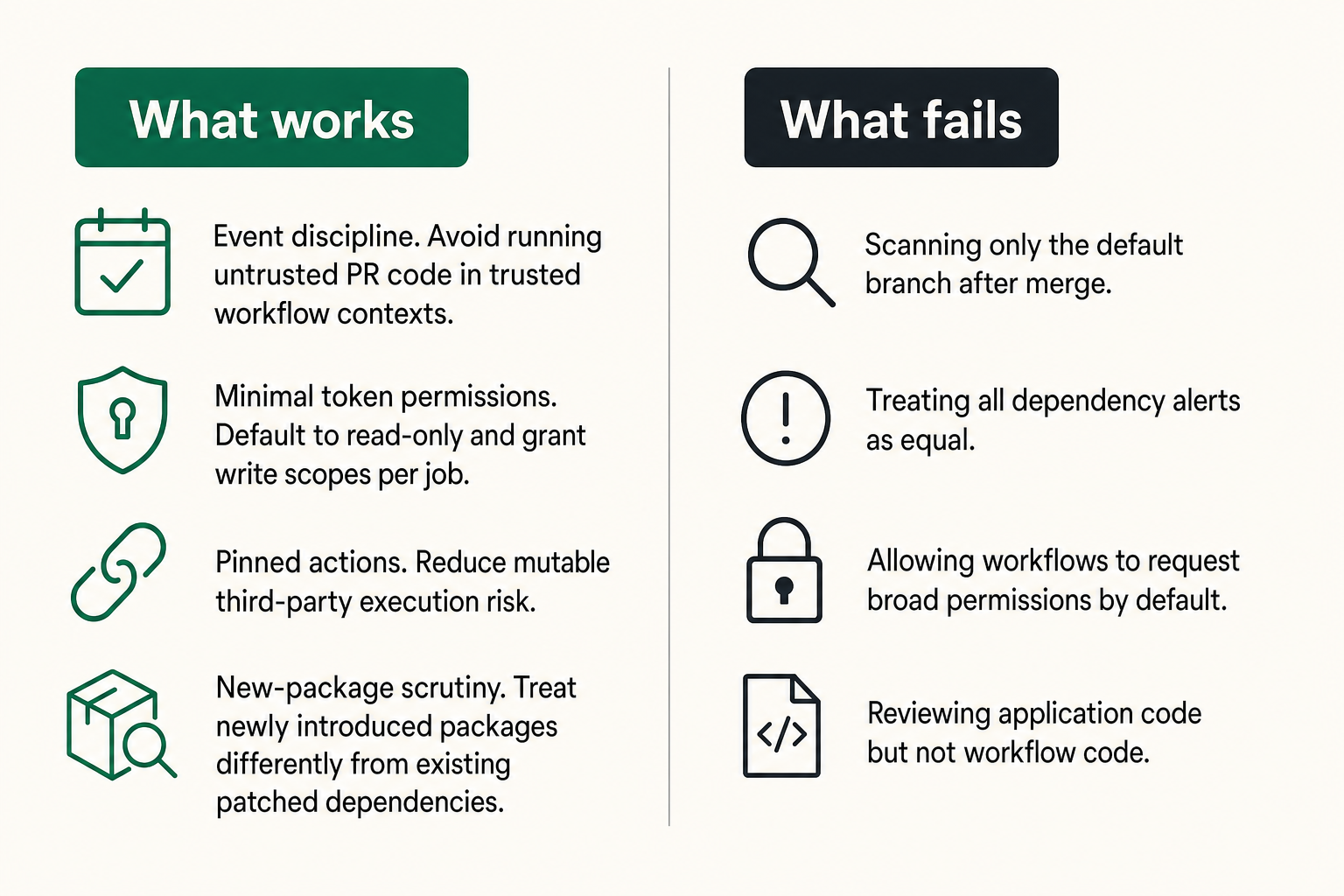
There is a sharp difference between controls that look good in an audit and controls that stop a CI/CD attack path.
The practical question is whether the control changes attacker economics. Does it force the attacker to gain another permission, bypass another review, compromise another identity, or produce a more detectable artifact? If not, it may be paperwork.
What works
Controls that work tend to be close to the arrow:
- Event discipline. Avoid running untrusted PR code in trusted workflow contexts.
- Minimal token permissions. Default to read-only and grant write scopes per job.
- Pinned actions. Reduce mutable third-party execution risk.
- New-package scrutiny. Treat newly introduced packages differently from existing patched dependencies.
- Protected environments. Require approval before deployment credentials become available.
- Artifact provenance. Track which workflow, commit, and dependency set produced an artifact.
- Expiring exceptions. Force risky transitions back into review.
These controls are not glamorous. They are effective because they sit where trust moves.
What fails
Controls fail when they are detached from workflow reality:
- Scanning only the default branch after merge.
- Treating all dependency alerts as equal.
- Allowing workflows to request broad permissions by default.
- Reviewing application code but not workflow code.
- Trusting artifacts because they came from CI, without validating which CI path produced them.
- Approving fork workflow runs without understanding what will execute.
- Letting exceptions live forever.
Related reading from our network: independent operators face a similar platform-dependence problem outside security; Are Freelance Websites Worth It in 2026? is a useful adjacent read on why channel design matters more than one visible interface.
Package Arrows Are Different From Code Arrows
Package risk is not just code risk with a different file extension. A dependency can execute during install, influence builds, pull transitive code, or change behavior based on environment. That makes package arrows especially sensitive in CI/CD.
The mistake teams make is assuming dependency security equals CVE matching. CVEs matter, but they are late signals. Supply-chain attacks often exploit the period before a package is widely understood to be malicious.
Known CVEs are the easy case
Known vulnerable versions are the easiest dependency problem to automate. The package name and version match a database entry. The fix is often upgrade, patch, or accept with justification.
That workflow is necessary, but incomplete. It does not catch many of the patterns that matter in active supply-chain attacks:
- Brand-new packages with suspicious maintainers.
- Typosquats or dependency confusion candidates.
- Install scripts that read secrets or network out.
- Obfuscated postinstall logic.
- Sudden maintainer or ownership changes.
- Transitive additions introduced by a harmless-looking top-level change.
The vu1nz writeup on what Dependabot misses is relevant here because the core issue is timing: known-vulnerability tools are strongest after the ecosystem has already labeled the problem.
Malware behavior needs context
A package behavior that is suspicious in one repository may be expected in another. A build tool may legitimately execute scripts. A native module may compile. A deployment client may read credentials. Context determines whether the arrow is dangerous.
For CI/CD, useful context includes:
- Is this package new to the repository?
- Does it run install-time scripts?
- Does it execute in a job with secrets?
- Does it appear only in dev dependencies but run in release jobs?
- Does the package communicate with new domains?
- Does the change affect lockfiles in a surprising way?
This is where many generic tools struggle. They can identify a package. They may not understand the pipeline authority around that package.
Runtime Feedback Should Close the CI/CD Loop
Arrow security should not end at merge. Production and runtime signals can sharpen pre-merge decisions if you connect them back to the pipeline.
That does not mean dumping SOC alerts into GitHub comments. It means using runtime evidence to improve the model of which arrows are risky.
Signals worth sending back to developers
Useful feedback signals include:
- Artifact hash observed in production.
- Deployment job that produced the running version.
- Package set included in the deployed artifact.
- Runtime network destinations introduced by a release.
- Secrets accessed during build or deployment.
- Cloud role assumed by a workflow.
- Incident tags mapped to the PR or workflow that introduced the change.
When these signals are connected, an investigation becomes faster. Instead of asking which change introduced this behavior, you can identify the artifact, the build, the workflow, the commit, and the package diff.
That changes the conversation during incidents. The team can reason about the actual trust path rather than reconstructing it from logs under pressure.
Do not turn SOC alerts into PR spam
Developer feedback should be selective. If runtime detection produces a weak signal, route it to investigation first. If it identifies a clear supply-chain transition, attach it to the repository context.
For example, do not comment on every outbound connection from a build. Do alert when a newly added package executes during install in a release workflow and connects to an uncommon external host while publish credentials are present.
The difference is context. Arrow security is valuable because it combines signal with position in the workflow.
Ownership, Exceptions, and Audit Trails
A control without ownership becomes theater. A control without exceptions becomes a bypass magnet. A control with permanent exceptions becomes a slow compromise.
The practical question is: who can accept risk for a trust transition, under what conditions, and for how long?
Define who can accept arrow risk
Approval should match the arrow type. A senior application maintainer may understand a dependency requirement, but may not be the right person to approve a workflow permission expansion. A platform engineer may understand CI permissions, but may not know whether a new cryptography package is legitimate.
A simple ownership model can work:
| Change type | Required owner | Example approval question |
|---|---|---|
| New package | Service owner or AppSec | Why is this dependency needed and what runs during install? |
| Workflow trigger change | Platform or DevSecOps | Can untrusted code reach trusted credentials? |
| Token permission increase | Platform security | Which job needs this permission and why? |
| Release automation change | Release owner | Can this path publish or sign artifacts? |
| Deployment role change | Cloud security or SRE | What production scope is granted? |
The point is not bureaucracy. The point is to stop pretending one approval means the same thing for every transition.
Make exceptions expire
Exceptions are necessary. A strict arrow security program that never allows exceptions will be bypassed during real delivery pressure.
But exceptions need structure:
- A named owner.
- A reason tied to the transition.
- A scope limited to repository, workflow, package, or environment.
- An expiration date.
- A review condition, such as dependency replacement or workflow redesign.
Practical rule: every exception should expire sooner than the memory of why it was granted.
Expired exceptions are not a punishment mechanism. They are how you prevent temporary operational decisions from becoming permanent architecture.
Where vu1nz.com Fits in an Arrow Security Architecture
Arrow security works best when checks happen before merge and understand CI/CD context. That is where lightweight, repository-native controls are more useful than another disconnected dashboard.
For teams using GitHub Actions, the goal is to catch workflow and package risk at the PR boundary, while the developer still has context and the change is still cheap to fix.
Product fit without changing your pipeline model
vu1nz.com is built around the assumption that CI/CD and package supply-chain attacks should be stopped before they merge. The vu1nz GitHub Action scans workflow security issues and newly added packages in PRs, which makes it a natural fit for an arrow security model: it sits directly on the transitions from proposed change to trusted automation.
That does not replace threat modeling, code review, runtime detection, or incident response. It gives the pipeline a better pre-merge gate for the arrows attackers commonly abuse.
Use it when you want checks that are close to developer workflow:
- PR-level feedback instead of after-the-fact reports.
- CI/CD workflow checks instead of only application code checks.
- New package review instead of only known CVE matching.
- A low-friction gate that can run alongside existing tools.
Closing the loop on arrow security
Arrow security is not a definition to memorize. It is an operating model for CI/CD trust transitions.
Map the arrows. Put controls where trust moves. Keep permissions narrow. Treat workflow files as privileged code. Review new package behavior before merge. Make exceptions expire. Feed runtime evidence back into the pipeline.
If you do that, arrow security becomes practical: fewer noisy findings, shorter investigations, and fewer chances for an attacker to turn a small PR into a production supply-chain incident.
Try vu1nz.com
vu1nz.com is for security engineers and DevSecOps teams who need to defend CI/CD pipelines and software supply chains from modern attacks. Try vu1nz.com.
Catch the next supply-chain attack on the PR that adds it.
14-day free trial · no card required