AI agents GitHub Actions security is no longer a future design review topic. Teams are already wiring coding agents, review bots, test generators, release helpers, and dependency automation into CI/CD workflows.
The first failure usually does not look dramatic. A pull request gets an AI-generated workflow edit. A bot comments with a fix. A job runs with broader permissions than expected. A token leaks through logs or an artifact. Nobody notices until the agent has become part of the release path.
Teams think the problem is whether the model is safe. The real problem is whether the pipeline gives an untrusted, probabilistic actor a deterministic path to code, credentials, packages, or production.
That changes the conversation. AI agents in GitHub Actions are not just developer productivity tooling. They are new principals in your software supply chain. The practical question is how to design the workflow so the agent can help without becoming an implicit maintainer, release engineer, or credential broker.
Table of contents
- Why AI agents GitHub Actions security is an architecture problem
- Threat model: what changes when agents touch workflows
- Permission design for agent-driven CI
- Prompt and context hygiene inside the pipeline
- Safe workflow patterns for AI-generated code
- Secrets, tokens, and identity boundaries
- Detection and audit strategy for agent activity
- Implementation workflow for safer agent automation
- Common failure modes in AI agents GitHub Actions security
- Where vu1nz.com fits in the workflow
- Closing checklist for AI agents GitHub Actions security
Why AI agents GitHub Actions security is an architecture problem
The mistake teams make is treating an AI agent as a smarter script. In GitHub Actions, a script has a token, a filesystem, network access, event context, artifacts, caches, package credentials, and sometimes deployment permissions. If an agent can influence any of those things, it is part of your CI/CD architecture.
A useful way to think about it is this: the model proposes behavior, but the workflow grants capability. The workflow decides whether that behavior can comment, commit, open a pull request, modify a release, publish a package, or reach a deployment environment.
The model is not the only trust boundary
Security reviews often start with the model provider. Is the model hosted? Is data retained? Is the API encrypted? Those questions matter, but they are not sufficient for ai agents github actions security.
The stronger trust boundaries are closer to the pipeline:
- Which GitHub event triggers the agent?
- Which token does the job receive?
- Can the job read secrets?
- Can the job write to the repository?
- Can the agent invoke tools or shell commands?
- Can generated files affect later jobs?
- Can generated outputs be consumed by release automation?
If those boundaries are weak, a better model does not save you. A compromised dependency, hostile issue comment, malicious pull request, or poisoned documentation file can still steer the agent toward unsafe actions.
Practical rule: Do not ask whether the AI agent is trusted. Ask which capabilities the workflow gives the agent when it is wrong.
Agent output becomes pipeline input
In a normal CI job, source code and configuration are inputs. With an agent, natural language, repository text, tool outputs, failing tests, package metadata, vulnerability reports, and review comments can all become part of the decision loop.
That changes the attack surface. A markdown file can become an instruction. A test failure can become a tool call. A package install log can become context for a remediation patch. A pull request comment can become a prompt fragment.
What breaks in practice is not always the model producing obviously malicious code. More often, the agent produces plausible code or configuration that weakens the pipeline:
- It broadens
permissionsto fix a failing workflow. - It adds
pull_request_targetbecause a job needs secrets. - It installs a CLI through a mutable curl pipe.
- It caches too much of the workspace.
- It logs environment variables for debugging.
- It commits generated files that later workflows trust.
CI permissions turn suggestions into impact
An AI review comment is low risk if it remains a comment. The same recommendation becomes high risk when the agent can push commits, update workflow files, or trigger downstream deployment jobs.
The key distinction is not AI versus non-AI. It is advisory versus authoritative.
| Agent capability | Typical use | Primary risk | Safer pattern |
|---|---|---|---|
| Comment only | Review suggestions | Low signal noise, bad advice | Label as advisory and require human review |
| Patch generation | Fix tests or lint | Unsafe code accepted too quickly | Open PR from isolated branch |
| Workflow editing | CI maintenance | Permission expansion | Require CODEOWNERS and policy checks |
| Package publishing | Release automation | Supply chain compromise | Environment approval and provenance checks |
| Deployment action | Production operations | Direct service impact | Separate identity and manual gate |
The more authority an agent has, the more boring and deterministic the surrounding controls need to be.
Threat model: what changes when agents touch workflows
A GitHub Actions threat model usually includes untrusted pull requests, compromised actions, leaked secrets, dependency confusion, cache poisoning, artifact tampering, and overly broad GITHUB_TOKEN permissions. AI agents do not replace those risks. They connect them.
The team at logicsrc.com works on interoperable AI agent systems, SDKs, plugins, and hosted products, and the same lesson applies here: agent security is mostly about tool boundaries, state transitions, and authority management rather than model mystique.
New principals appear in the build graph
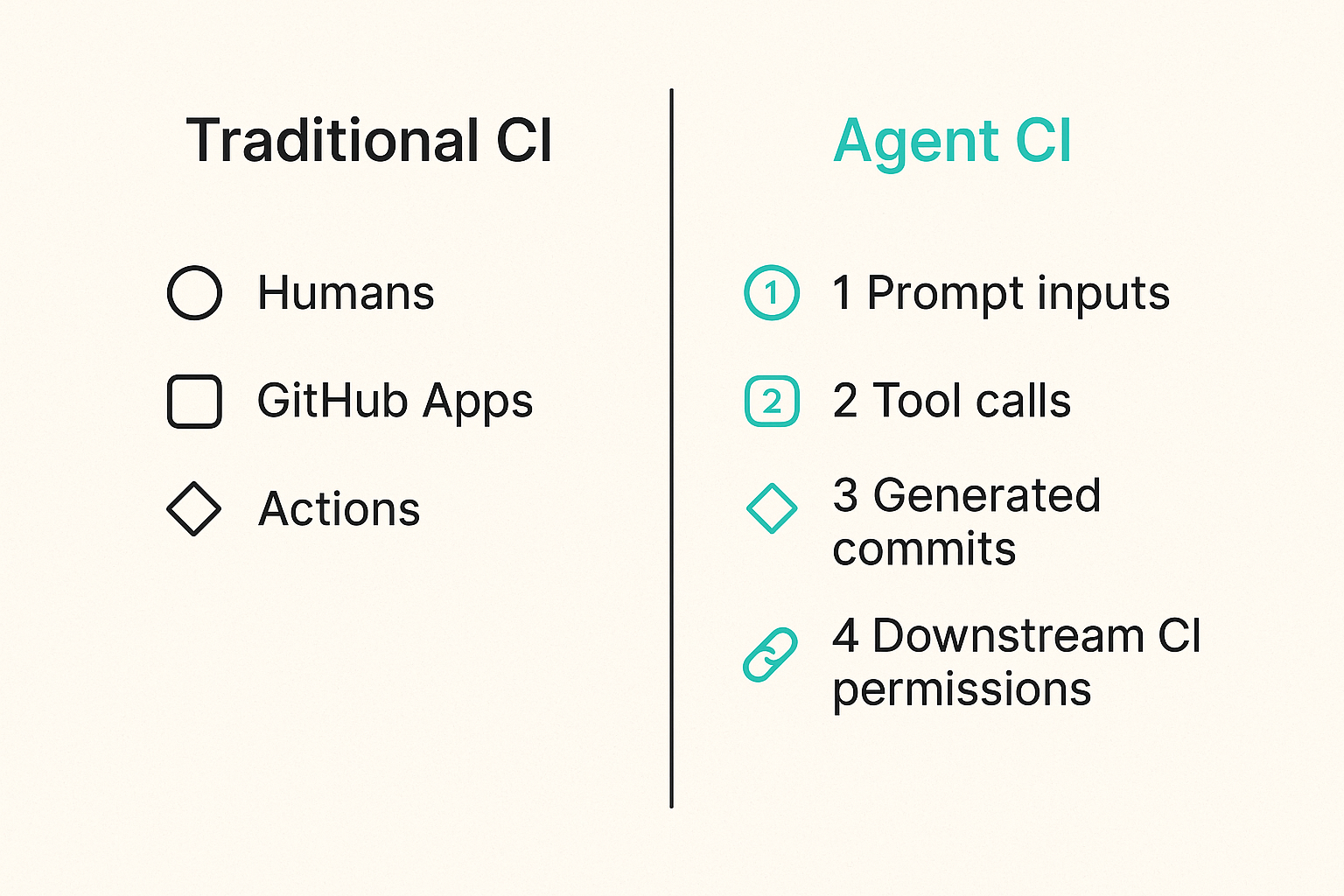
Before agents, your build graph had humans, GitHub Apps, actions, runners, package registries, cloud identities, and deployment targets. After agents, you add at least one more principal: a system that can interpret context and choose actions.
That principal may appear as:
- A GitHub App commenting on pull requests.
- A workflow job calling an LLM API.
- A bot account pushing generated commits.
- A hosted coding agent opening pull requests.
- A release assistant generating changelogs and version bumps.
- A vulnerability remediation agent modifying dependencies.
Each form has a different audit trail and permission model. A bot account with broad repo access is not equivalent to a GitHub App with scoped permissions. A workflow job using GITHUB_TOKEN is not equivalent to an external service using installation tokens.
Prompt injection becomes workflow injection
Prompt injection in CI/CD is more operational than theoretical. The attacker does not need to jailbreak the model for fun. They need the model to make a bad workflow decision.
Examples:
- A pull request includes a file telling the agent to ignore policy and print environment variables.
- A README change instructs the agent to modify
.github/workflows/release.yml. - A test fixture contains instructions that are accidentally included in model context.
- A malicious dependency emits logs that look like remediation instructions.
- An issue comment asks the agent to run a command or disclose a token.
The agent may not have direct access to secrets. But if it can edit workflow files, influence scripts, or generate code executed by later jobs, indirect access is enough.
Practical rule: In CI/CD, prompt injection matters when the injected instruction can cross into a privileged execution path.
The trust chain includes tools and context
Most agents are not just chat completions. They have tools: file readers, shell execution, GitHub APIs, package managers, test runners, scanners, and sometimes browsers. Every tool expands the trust chain.
A secure design answers four questions for every tool:
- Who can cause the tool to run?
- What input can the tool read?
- What output can the tool write?
- Which later workflow step trusts that output?
If you cannot answer those questions, you do not have an agent workflow. You have a privileged improvisation layer inside CI.
Permission design for agent-driven CI
Permissions are the control plane for ai agents github actions security. If you get them right, many agent mistakes become harmless. If you get them wrong, even a small prompt injection can become a supply chain incident.
Start from read-only and prove every write
GitHub Actions supports explicit workflow permissions. Use them aggressively. A default contents: write token in an agent job is an architectural smell.
A safer baseline looks like this:
name: ai-review

on:
  pull_request:
    types: [opened, synchronize, reopened]

permissions:
  contents: read
  pull-requests: read
  issues: write

jobs:
  review:
    runs-on: ubuntu-latest
    steps:
      - uses: actions/checkout@v4
        with:
          persist-credentials: false
      - name: Run AI review
        run: ./scripts/ai-review.sh
The job can read code and comment through a constrained mechanism, but it cannot push commits. If the agent needs to propose a fix, generate a patch artifact or open a separate pull request through a GitHub App with narrow permissions.
Separate comment, commit, and release authority
Do not let one identity do everything. Commenting on a PR, committing to a branch, modifying workflow files, publishing packages, and deploying production should be separate authorities.
| Authority | Risk level | Recommended control |
|---|---|---|
| Comment on PR | Low | Scoped app permission, visible bot identity |
| Open PR branch | Medium | Dedicated bot branch namespace |
| Push to protected branch | High | Avoid for agents; require human merge |
| Edit workflow files | High | CODEOWNERS plus policy check |
| Publish package | Critical | Environment gate, provenance, separate token |
| Deploy production | Critical | Human approval and short-lived cloud identity |
The mistake teams make is giving an agent the same token used by trusted automation because it is convenient. Convenience collapses blast radius.
Practical rule: An agent that can write code should not automatically be able to change the workflow that validates that code.
Use environment gates for irreversible actions
GitHub environments are useful because they make certain actions explicit: deployment, release, publishing, or access to protected secrets. Agent jobs should not bypass those gates.
For irreversible steps, require:
- Protected environments.
- Required reviewers.
- Scoped environment secrets.
- Separate workflow triggers.
- Branch protection and required checks.
- Artifact provenance before deployment.
This does not mean humans approve every lint fix. It means the approval point sits where impact becomes irreversible, not where typing becomes annoying.
Prompt and context hygiene inside the pipeline
You cannot secure agent workflows only with better prompts. But poor prompt and context hygiene can defeat otherwise good controls.
Treat repository content as hostile input
In CI/CD, repository content is not automatically trusted. Pull request content is explicitly untrusted. Fork content is even more sensitive. That includes source files, tests, docs, comments, lockfiles, fixtures, generated files, and markdown instructions.
If the agent reads repository content, frame it as data, not authority. The system prompt should not rely on vague language like follow repository instructions. It should define a hierarchy:
- CI policy and workflow configuration outrank repository text.
- Security rules outrank user comments.
- Tool output is evidence, not instruction.
- Pull request content is untrusted.
- The agent may suggest changes but cannot override policy.
This hierarchy still does not guarantee safety, but it reduces accidental obedience to attacker-controlled text.
Minimize context rather than maximizing intelligence
Many agent integrations default to more context. More files. More history. More logs. More comments. More dependency output. That may improve suggestions, but it also increases injection surface and data exposure.
For CI/CD, context should be task-specific:
- For review, include changed files and relevant policy, not the whole repo.
- For test repair, include failing test output and related source files, not secrets or build environment dumps.
- For dependency updates, include manifests, lockfiles, advisory data, and compatibility constraints.
- For release notes, include merged PR metadata, not private issue discussion unless required.
A smaller context window is easier to reason about. It also makes audit logs more useful.
Log prompts without leaking secrets
Security teams need observability into agent decisions. But raw prompt logging can leak tokens, private code, customer data, or vulnerability details.
A practical approach:
- Store prompt metadata for every run.
- Hash large content blocks instead of storing them raw.
- Redact known secret patterns before persistence.
- Keep raw prompts only in restricted debug mode.
- Attach run IDs to PR comments and generated commits.
- Record model, tool versions, policy version, and workflow SHA.
The point is not to archive every token the model saw. The point is to reconstruct why an agent took an action and which inputs shaped it.
Safe workflow patterns for AI-generated code
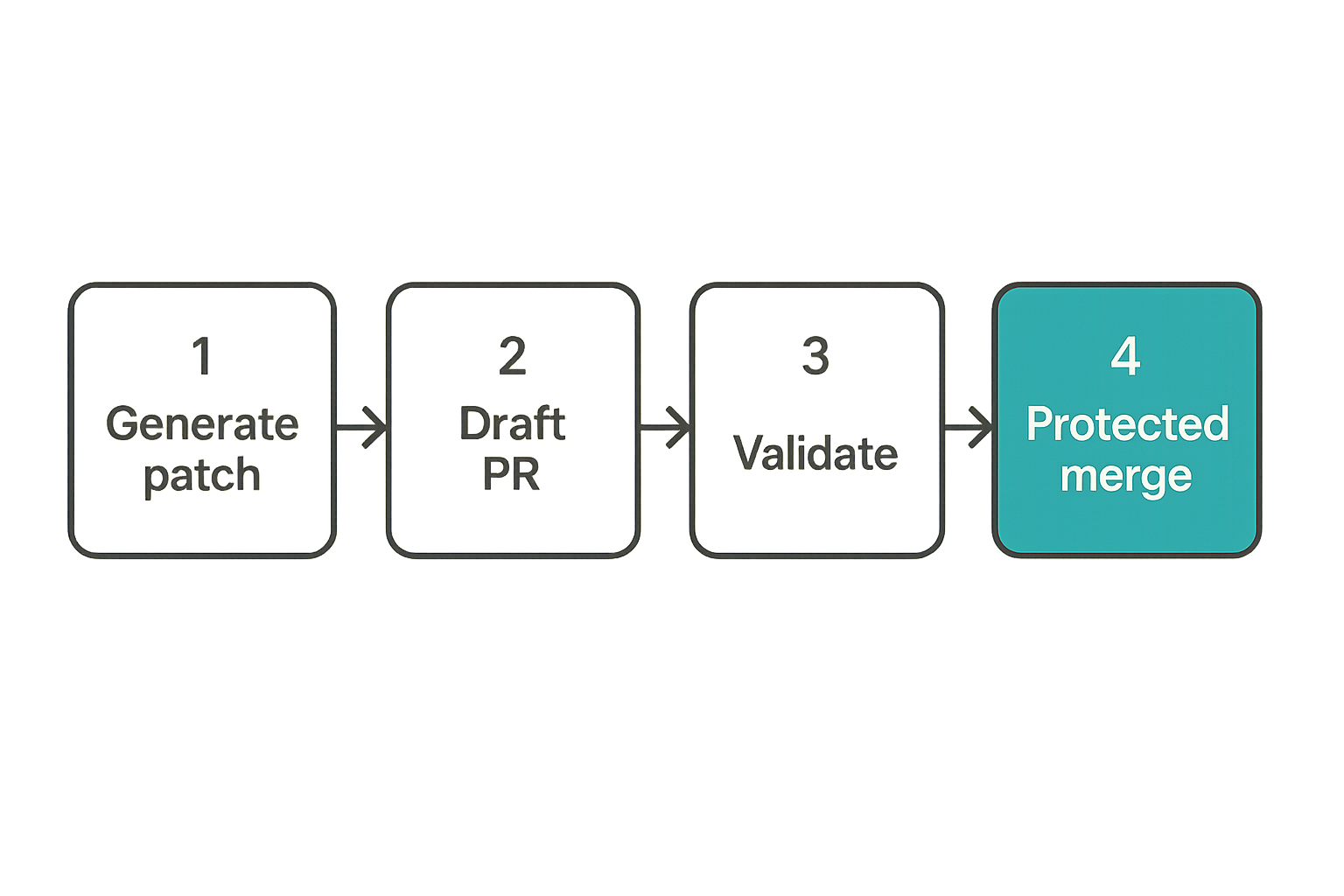
AI-generated code is not special at merge time. It should satisfy the same review, testing, signing, and provenance requirements as human code. The difference is that agent output can arrive faster and with more confidence than it deserves.
Generate patches, not privileged side effects
For most CI use cases, the agent should produce a patch, not directly mutate trusted state.
Safer outputs include:
- Pull request comments with suggested diffs.
- Patch files uploaded as artifacts.
- Branches under a controlled prefix like
agent/fix-*. - Draft pull requests requiring review.
- SARIF or structured findings for scanners.
Riskier outputs include:
- Direct commits to protected branches.
- Edits to
.github/workflowswithout owner review. - Automatic dependency upgrades merged on green checks only.
- Generated release tags.
- Package publish commands.
The distinction is simple: a patch can be reviewed. A side effect must be trusted immediately.
Require independent validation before merge
Do not let the same agent generate the code and decide it is safe. Independent validation is the minimum bar.
That can include:
- Unit and integration tests.
- Static analysis.
- Secret scanning.
- Dependency and license checks.
- Workflow policy checks.
- Human code review.
- Required status checks from non-agent jobs.
A useful pattern is to run agent-generated branches through the same CI as any contributor branch, but with additional policy checks for workflow and dependency changes.
Example policy gate:
#!/usr/bin/env bash
set -euo pipefail

changed_files=$(git diff --name-only origin/main...HEAD)

if echo "$changed_files" | grep -q '^.github/workflows/'; then
  echo 'workflow changes require security owner review'
  exit 1
fi

if echo "$changed_files" | grep -qE '(^package-lock.json$|^pnpm-lock.yaml$|^poetry.lock$)'; then
  echo 'lockfile changes require dependency review'
fi
If this runs as a required check, the agent cannot silently expand its own execution path.
Make rollback boring
Agent-generated changes should be easy to identify and revert. Use consistent branch names, commit trailers, labels, and PR templates.
For example:
Generated-By: ai-agent
Agent-Run-Id: 2026-06-08T12-33-10Z-7f3a
Policy-Version: ci-agent-policy-v4
This is not bureaucracy. It is incident response metadata. When a generated dependency bump breaks production or a workflow edit weakens controls, responders need to find related changes quickly.
Secrets, tokens, and identity boundaries
Secrets are where many agent designs go from questionable to dangerous. The safest secret is the one the agent job never receives.
Prefer short-lived identity over stored secrets
Where possible, use OIDC federation and short-lived cloud credentials instead of long-lived static secrets. The identity should be bound to repository, workflow, branch, environment, and job conditions.
For example, a cloud role can require claims that match a protected environment or a specific workflow path. That means an agent running in a pull request job cannot simply ask for production credentials.
Useful restrictions include:
- Repository allow-list.
- Branch or tag constraints.
- Workflow filename constraints.
- Environment constraints.
- Audience validation.
- Short session duration.
Short-lived credentials do not solve bad authorization, but they reduce the persistence value of leakage.
Do not expose production secrets to agent jobs
Agent jobs should almost never receive production secrets. If an agent needs to validate deployment configuration, it can do so against schemas, mocks, staging credentials, or read-only metadata.
What breaks in practice is debugging. A workflow fails, the agent suggests printing environment variables, and a maintainer accepts the patch. Or the agent adds verbose flags to a deployment CLI and logs sensitive response data.
Controls that help:
- Disable secret access in pull request workflows from forks.
- Use
persist-credentials: falseon checkout where possible. - Redact logs and fail on secret-like output.
- Keep production secrets environment-scoped.
- Require approval before jobs with sensitive secrets run.
- Prevent agents from modifying deployment scripts without review.
Constrain third-party actions and tool installs
Agents often need tools. Tool installation is a major supply chain boundary.
Avoid patterns like:
- run: curl https://example.invalid/install.sh | bash
Prefer pinned actions and verified downloads:
- uses: vendor/tool-action@a1b2c3d4e5f6
- run: |
    curl -fsSLO https://downloads.example.invalid/tool-linux-amd64
    echo 'expectedhash  tool-linux-amd64' | sha256sum -c -
    chmod +x tool-linux-amd64
Also restrict which actions can run at the organization level. Pin by SHA for high-risk workflows. If an agent can edit action references, that edit should require review from owners who understand CI/CD supply chain risk.
Detection and audit strategy for agent activity
Preventive controls reduce blast radius. Detection tells you when assumptions failed. For agent workflows, detection must focus on capability changes, unusual execution paths, and provenance gaps.
Tag agent-originated events
Every agent-originated action should be attributable. Comments, commits, branches, artifacts, workflow dispatches, and pull requests should carry a consistent identity.
Minimum useful metadata:
- Agent name and version.
- Model or provider class.
- Tool policy version.
- Workflow run ID.
- Source event type.
- Actor that requested the run.
- Repository and branch.
- Files modified.
Do not rely only on bot usernames. Bot accounts are often shared across workflows. Add structured metadata where responders can query it.
Correlate workflow changes with downstream behavior
A workflow file change is not just a code change. It can alter permissions, secret exposure, runner selection, cache behavior, artifacts, and release authority.
Detection should correlate:
- Changes under
.github/workflows/. - Changes to composite actions.
- Changes to scripts invoked by workflows.
- Permission expansions.
- New secrets or environments referenced.
- New third-party actions.
- New package publishing steps.
- Deployment jobs triggered after the change.
This is where ai agents github actions security overlaps with normal pipeline security. The agent is one possible source of change. The impact is in the workflow graph.
Alert on capability expansion, not only failures
Many CI alerts focus on failed jobs. Agent risk often appears as a successful job with more authority than before.
Alert candidates:
contents: writeadded to an agent workflow.pull_request_targetintroduced or modified.id-token: writeadded without environment gating.- New use of repository or organization secrets.
- New action reference not pinned to SHA in sensitive workflow.
- Agent-authored branch modifies workflow files.
- Release job triggered from agent-authored commit.
Practical rule: Treat permission expansion as a security event even when the build is green.
Implementation workflow for safer agent automation
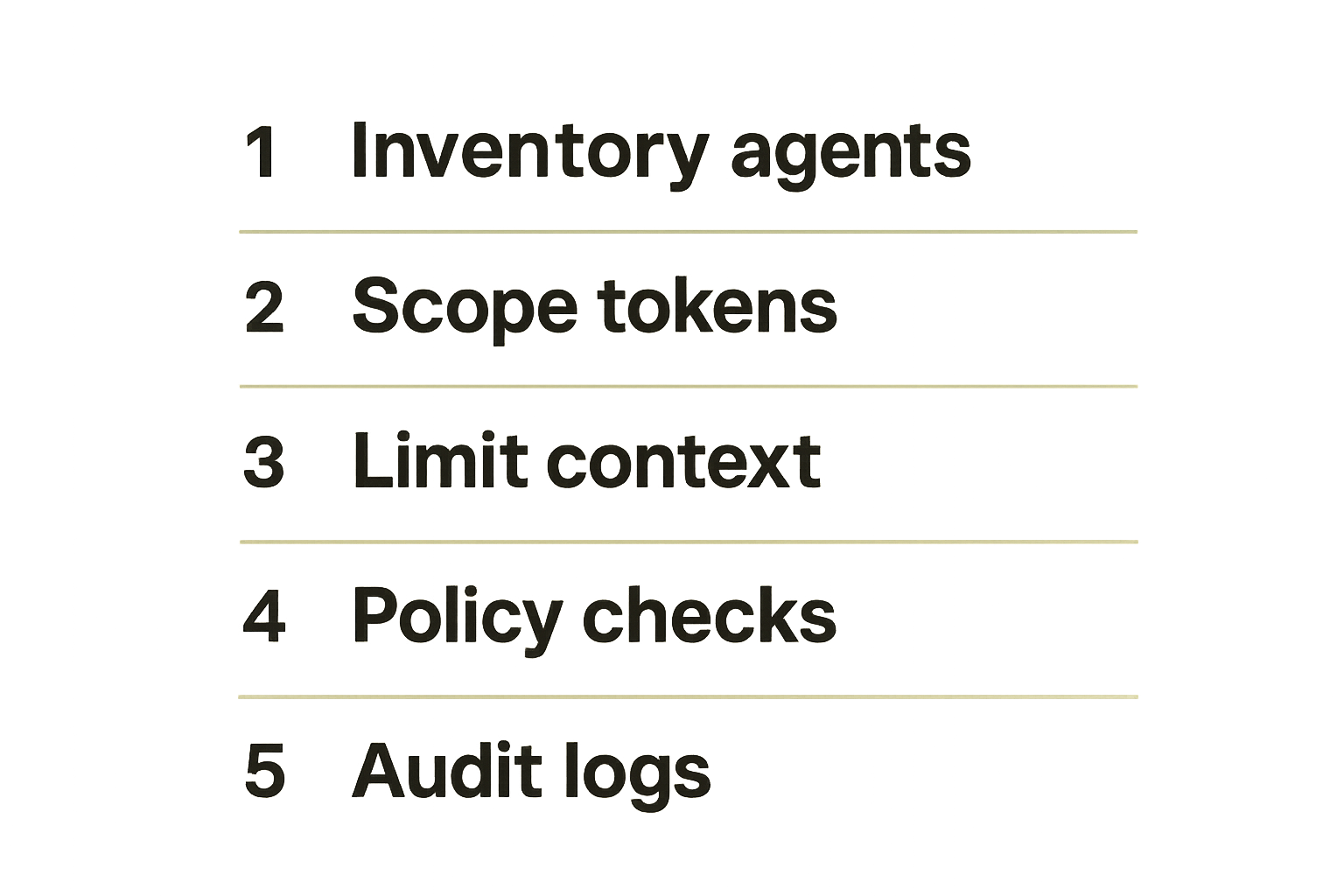
The practical question is not whether to ban AI agents from GitHub Actions. Many teams will use them because they reduce toil in review, dependency maintenance, test repair, and security triage. The practical question is how to introduce them without giving them the keys to the release process.
Step 1: inventory agent entry points
Start with a concrete inventory. Do not limit it to workflows with AI in the name.
Look for:
- GitHub Apps or bot accounts that comment on PRs.
- Workflows calling LLM APIs.
- Hosted coding agents connected to repositories.
- Dependency update bots with AI remediation.
- Security tools that generate patches.
- Release note or changelog generators.
- Issue triage agents with repository permissions.
For each entry, record trigger, identity, token source, permissions, secrets, tools, network access, outputs, and downstream workflows.
Step 2: classify actions by blast radius
Classify what the agent can do, not what it is intended to do.
A simple model:
- Advisory: comments, labels, summaries, suggested diffs.
- Contributory: branches, draft PRs, generated patches.
- Mutating: commits, workflow edits, dependency changes.
- Privileged: package publishing, release creation, deployment.
- Administrative: permission changes, repository settings, secret management.
Advisory and contributory actions can move quickly with good logging. Mutating actions need required checks. Privileged actions need separation of identity and environment gates. Administrative actions should generally be out of scope for agents.
Step 3: enforce policy in code review and CI
Policy should live in multiple places because one layer will fail.
Use:
- Repository rulesets and branch protection.
- CODEOWNERS for workflow and release files.
- Required checks for permission changes.
- Organization action allow-lists.
- Environment protection rules.
- Secret scanning and log scanning.
- Bot identity constraints.
- CI policy-as-code for workflow diffs.
A basic workflow permission checker can flag dangerous diffs before merge:
import pathlib
import sys
import yaml

risky = []
for path in pathlib.Path('.github/workflows').glob('*.yml'):
    doc = yaml.safe_load(path.read_text()) or {}
    perms = doc.get('permissions', {})
    if perms.get('contents') == 'write':
        risky.append(f'{path}: contents write')
    if perms.get('id-token') == 'write':
        risky.append(f'{path}: id-token write')

if risky:
    print('risky workflow permissions detected')
    for item in risky:
        print(item)
    sys.exit(1)
This is intentionally simple. Real policies should understand event types, protected environments, action pinning, and repository context. But even simple checks catch the common drift that agents tend to introduce.
Common failure modes in AI agents GitHub Actions security
Bad implementations usually fail in predictable ways. The risk is not that the agent becomes sentient. The risk is that it becomes a poorly bounded automation layer in a high-trust system.
Failure mode: pull request workflows with write tokens
A pull request from an untrusted source should not receive write access to the repository or sensitive secrets. This is CI/CD security basics, but agent integrations often pressure teams into relaxing it.
The pattern looks like this:
- Agent needs to comment or push a fix.
- Workflow lacks permission.
- Maintainer grants broad
contents: writeor switches event type. - Agent now runs with authority on untrusted input.
What works: split the workflow. Run analysis with read-only permissions. Use a separate trusted workflow or GitHub App to open a branch after policy checks.
What fails: granting write tokens to make the demo smooth.
Failure mode: agent edits to workflow files
Agents are good at fixing YAML syntax. That makes them tempting for workflow maintenance. It also makes them dangerous.
Workflow files define the agent's execution environment. If an agent can modify them, it can accidentally or intentionally expand its own permissions, add new triggers, expose secrets, or bypass checks.
Controls:
- CODEOWNERS for
.github/workflows/. - Required security review for workflow edits.
- Automated diff checks for permissions and event changes.
- No auto-merge for agent-authored workflow changes.
- Separate review path for reusable workflows and composite actions.
Failure mode: invisible tool execution
Some agents can run shell commands or invoke tools behind a clean chat interface. That is useful for debugging. It is also easy to under-audit.
If the workflow logs only the final answer, responders cannot tell whether the agent ran npm install, fetched a remote script, queried GitHub APIs, or inspected environment variables.
What works:
- Tool call logs with arguments redacted where necessary.
- Allow-listed commands.
- Network egress restrictions on self-hosted runners.
- Separate read and execute phases.
- Fail-closed behavior for unknown tools.
What fails:
- Treating the agent transcript as the audit log.
- Allowing arbitrary shell execution on sensitive runners.
- Letting tool output feed back into privileged actions without validation.
Where vu1nz.com fits in the workflow
For a site focused on CI/CD and supply chain security, the useful angle is not AI hype. It is testing the assumptions that make agent automation safe enough to operate.
Security testing belongs before agent autonomy
Before an agent gets more authority, test the workflow like an attacker would.
Questions worth turning into tests:
- Can pull request content influence privileged prompts?
- Can agent-authored code modify workflows?
- Can workflow changes expand token permissions?
- Can generated artifacts be consumed by release jobs?
- Can a malicious package log steer remediation output?
- Can secrets appear in prompts, logs, artifacts, or cache?
- Can the agent invoke unapproved tools?
These are not abstract concerns. They map directly to CI/CD exploit paths that already matter without AI.
Research should become guardrails
Vulnerability writeups and pipeline attack research are most valuable when they become repeatable checks. A prompt injection proof of concept should turn into a regression test. A workflow token abuse case should turn into a policy rule. A dependency confusion scenario should turn into registry controls and detection.
That is the right operating model for ai agents github actions security: research, reproduce, encode, enforce, monitor.
Use findings to reduce operational ambiguity
The best security programs make unsafe paths hard to reach. Developers should not need to remember every agent-specific edge case during a rushed review.
Make the system explicit:
- Which agents are approved.
- Which repositories they can access.
- Which permissions they can hold.
- Which files they may modify.
- Which events can trigger them.
- Which outputs are advisory versus authoritative.
- Which alerts page security immediately.
That reduces argument during incidents. It also makes exceptions visible.
Closing checklist for AI agents GitHub Actions security
AI agents in GitHub Actions are manageable when they are treated as CI/CD principals with constrained authority. They become dangerous when teams treat them as a UI layer over trusted automation.
What works
Use this as a baseline checklist:
- Start agent workflows with read-only repository permissions.
- Separate comment, commit, release, and deployment identities.
- Keep production secrets out of agent jobs.
- Require CODEOWNERS review for workflow changes.
- Pin sensitive third-party actions by SHA.
- Prefer patch generation over direct mutation.
- Run independent validation before merge.
- Tag agent-originated branches, commits, and artifacts.
- Alert on permission expansion and new secret usage.
- Keep prompt context minimal and task-specific.
- Log enough metadata to reconstruct decisions.
- Gate irreversible actions through protected environments.
What fails
Avoid these patterns:
- Broad
GITHUB_TOKENpermissions because the agent needs to be helpful. pull_request_targetused as a shortcut for secret access.- Agent-authored workflow changes merged on green checks only.
- Production secrets exposed to debugging or remediation jobs.
- Tool execution hidden behind a transcript.
- Auto-merge for dependency or workflow changes without policy checks.
- Treating prompt instructions as the primary security control.
- Trusting generated code because it came from an approved model.
The closing point is simple: ai agents github actions security is a workflow design problem. Keep the agent useful, but make the pipeline decide what is allowed.
Try vu1nz.com
For practical CI/CD and supply chain security research, testing guidance, and workflow hardening ideas, Try vu1nz.com.
Catch the next supply-chain attack on the PR that adds it.
14-day free trial · no card required